
Google Workspace Drops — Major Platform Updates Available Today
Welcome to the autumn digest of Google Workspace updates! In this article, you will learn about the new capabilities of the platform and Gemini AI tools to enhance daily productivity:
-
Automatic organization in Google Drive: intelligent grouping of files and folder creation using the “Organize my files” feature.
-
Quick formula fixing in Google Sheets: automatic analysis of syntax or logical errors and their one-click fixing thanks to Gemini.
-
Flexible draft editing in Gmail: targeted email adjustments and details insertion using the enhanced prompt panel of the “Help me write” tool.
-
Creating presentations and videos in Slides and Vids: generating branded slides from text descriptions, using AI avatars as digital presenters, and video editing via Gemini Omni Flash.
-
Optimizing work in Google Docs: automatic processing and summarization of comment threads, as well as generating infographics and images tailored to the document’s context.
-
New Google Meet functionality: safe participation in calls from a car via Android Auto, auto-adding slide screenshots to notes, and consolidating meeting materials into separate folders.
-
Test generation in Google Forms: quick creation of quizzes and training materials based on text prompts and files from Google Drive.
-
Scaling processes in Workspace Studio: creating specialized AI “skills” to automate routine tasks and implementing enterprise security controls in Studio Flows.
Organize your Drive faster than ever with Organize my files
Instead of manually dragging files into folders, let Drive do the work for you. The new Organize my files feature intelligently suggests the best folders for your individual files or creates new ones to group related items. You have full control over which suggestions to accept: review them one file at a time or approve them in bulk for fast organizing.

Keep your Drive organized using the “Organize my files” feature in Drive.
Accelerate data analysis by eliminating formula errors with Gemini in Sheets
Whether you are building complex financial models or project trackers, a syntax typo or incorrect reference in a formula can stall your work. Gemini in Google Sheets now makes fixing formula errors significantly easier.
If you encounter a formula error, click the “Fix” button, and Gemini will automatically analyze the context and data structure to identify the logical or syntax error. Gemini will explain the issue and, where possible, fix the formula directly in the cell, saving time on troubleshooting so you can focus on data analysis.
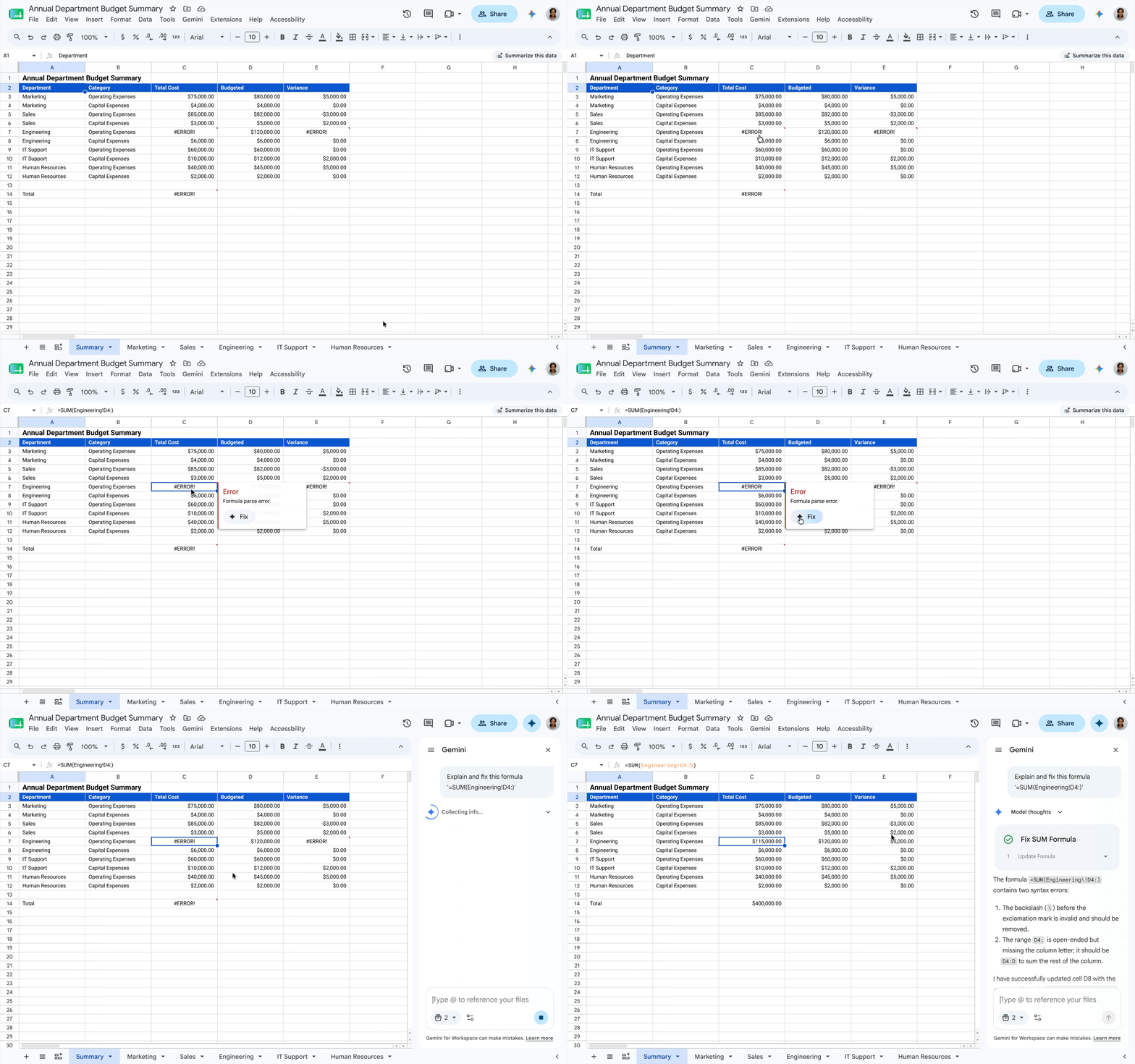
Quickly resolve formula errors using Gemini in Sheets.
Refine email drafts with the enhanced Help me write feature in Gmail
Help me write in Gmail now helps you create the exact message you need. Simply turn to Help me write for your first draft. If the result isn’t perfect, you can now use the prompt panel to make targeted edits. Whether you need to add a missing detail to the second line or specify a deadline for your request, simply type an instruction, and Gmail will instantly update the draft.

Create perfect messages thanks to the enhanced “Help me write” feature.
Create engaging videos and presentations with Gemini in Slides and Vids
Presentations that resonate with your customers are extremely effective, but producing them at scale can feel like a full-time job. That’s why the Google Workspace team launched enhancements for Google Slides and Google Vids avatars:
Create branded presentations in minutes, not hours: Thanks to the new slide generation feature in Google Slides, you can bypass hours of manual effort and generate a ready-made presentation significantly faster. Simply describe the presentation you want to create and reference any existing slides to instantly adapt formatting and your brand style. Gemini then works in the background, gathering context from your Google Docs, Sheets, PDFs, or previous presentations, asking clarifying questions to build a comprehensive outline. In just a few minutes, you will receive an impressive, fully editable presentation tailored to your needs.
Scale your presentations using Vids digital presenters: As a presenter, you are likely familiar with the challenges of presenting content repeatedly, learning new scripts, or completely changing text at the last minute. With Vids AI avatars, you can automatically storyboard slides or generate a script, turning your avatar into a digital presenter. And if you need to reach a broader audience, you can easily rewrite the avatar’s script at any time or generate AI voiceovers in eight languages, including Japanese, Korean, Spanish, and French.
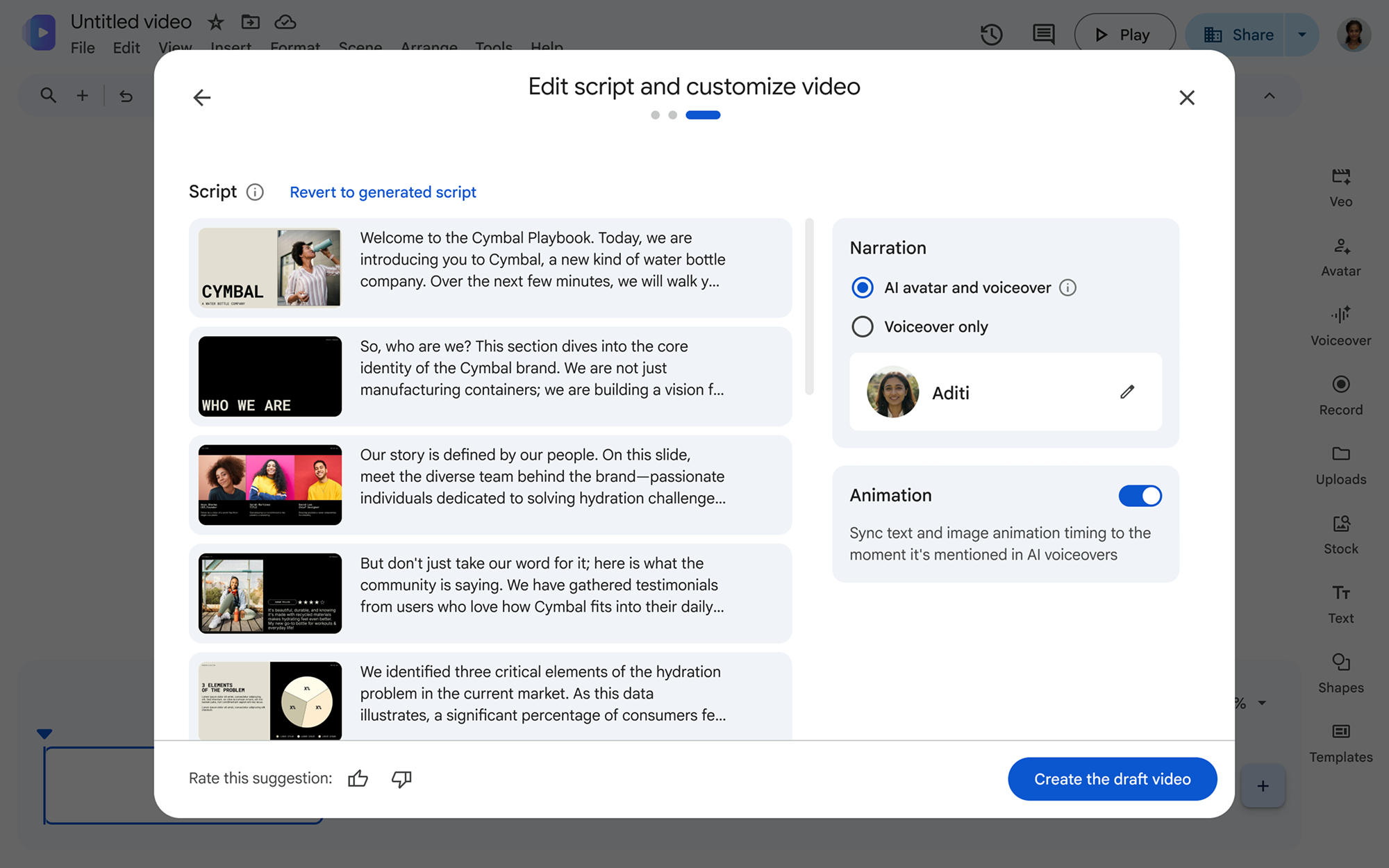
Turn your presentations into video presentations with a ready-made draft script.
Create with Gemini Omni Flash in Vids: Thanks to Gemini Omni Flash in Google Vids, you can now edit any video content — from phone footage to AI clips. You can also generate new videos with avatars that look and sound just like you, without spending time in a studio or preparing in front of a camera.
Reach the final draft faster through comment management and visual creation with Gemini in Docs
Let Gemini handle your comments in Docs: Gathering feedback is vital for collaboration, but reviewing comment threads in a document can be time-consuming. To help you reach the final version faster, Gemini in Docs helps summarize comment threads, create and reply to comments, and quickly incorporate feedback by suggesting document edits that you can accept with a single click.
Bring documents to life with expressive graphics in Docs: Suppose you want to supplement your text with visuals, but don’t have time to create them from scratch. Gemini in Docs now allows you to create and edit images, diagrams, and infographics using natural language prompts. Understanding the context of your document, Gemini generates relevant infographics, adjusts the style, and updates multiple visual elements at once — all without using third-party tools.
Stay productive on the go with Meet on Android Auto
Join Google Meet on Android Auto: Thanks to the new Google Meet integration with Android Auto, you can check your schedule of upcoming meetings and join audio-only calls hands-free with a single tap. You can also make and receive direct audio calls on the “History” tab, allowing you to dial anyone without taking your attention off the road.
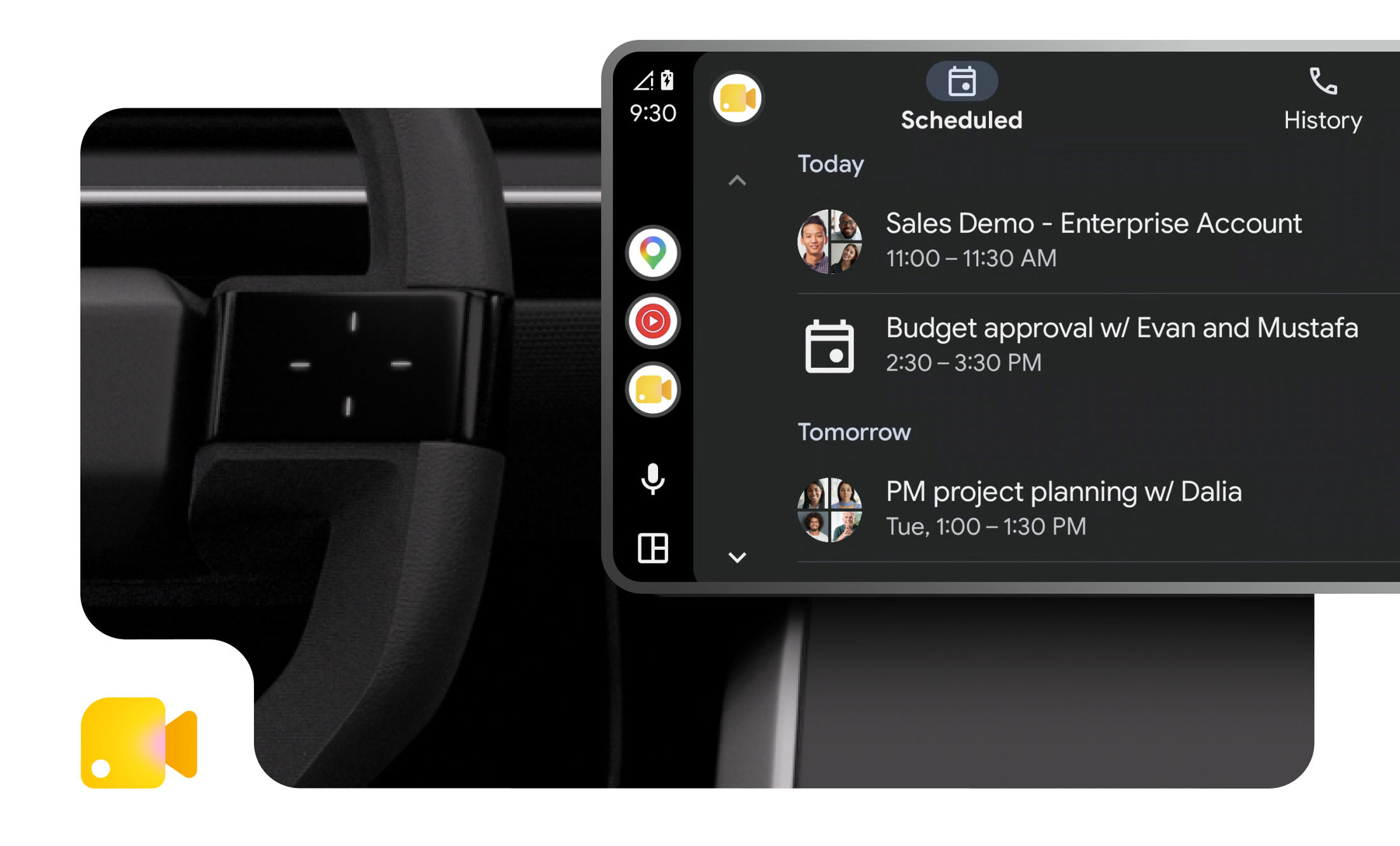
Join meetings from your car using Google Meet on Android Auto.
Get visual and text context alignment and organized meeting notes with Google Meet
Get presentation screenshots in Meet notes: The “Take notes for me” feature in Google Meet has become significantly more informative thanks to presentation screenshots. Where standard notes often lack context, Take notes for me now captures screenshots of presented slides alongside key takeaways. You get the “what” (action items/key points) and the “why” (visual context) in one overall summary, eliminating the need to decipher vague references like “as you can see on this slide.”

Get more visual materials in meeting summaries thanks to presentation screenshots in Google Meet.
Eliminate post-meeting chaos: Whether you’re a meeting organizer or a participant, you’ve likely had to manually search for files after a meeting ends. Instead of searching for them manually in Drive, Google Meet now automatically organizes every artifact — meeting notes, transcripts, and recordings — into a parent folder named “Google Meet” in the organizer’s “My Drive.” Participants automatically receive Drive shortcuts to these files, so as an organizer, you can avoid sending follow-up emails. Even better? Everything is organized in a single parent folder, creating a permanent, searchable meeting hub and turning scattered files into an actionable project resource.

Get meeting notes, transcripts, and recordings consolidated into folders for each meeting.
Generate tests with the “Help me create” feature in Google Forms
Want to quickly create a quiz to test knowledge during onboarding or training, but don’t have time to build it from scratch? Help me write in Google Forms now supports quiz generation. Write a prompt describing the desired quiz, reference files from Google Drive (such as Docs, Slides, or PDFs), and Gemini will generate a complete quiz with appropriate settings, including correct answers for each question. Review your test, adjust question types, and share it with your team in a few clicks.
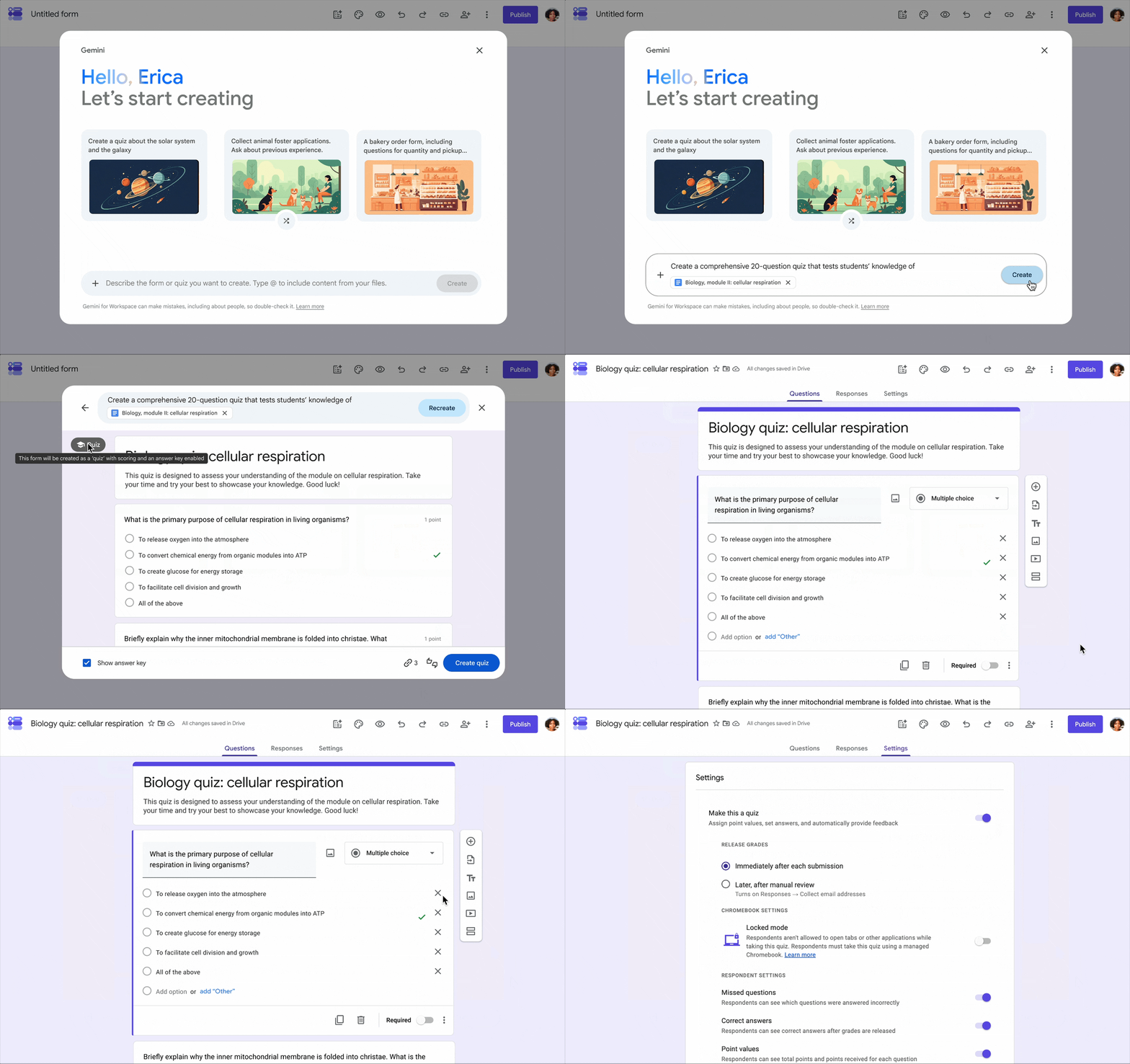
Create a quiz using a text prompt and a PDF file with the “Help me create” feature in Google Forms.
Implement brand standards, templates, and processes using Workspace skills
Simplify and scale your daily tasks with Workspace Studio skills: Many professionals have tedious recurring tasks that eat into work time. What if you could hand them off to a specialized AI teammate? With skills in Workspace Studio, you can create and share a reusable prompt that guides Gemini to use your team’s rules, templates, and reference files to automate business processes, turning Gemini into a highly specialized tool for your needs. Skills are located directly in Workspace side panels to simplify recurring tasks, such as creating:
- Brand consistency: maintain an approved tone, style, and visual identity in email drafts and files.
- Standardized templates: format proposals, contracts, and project trackers according to exact specifications.
- Status updates: keep updates aligned with your preferred format and active meeting notes, chats, and files without re-uploading them.
Invoke skills at any time using @mentions in Gmail, Docs, Slides, Drive, and Chat.
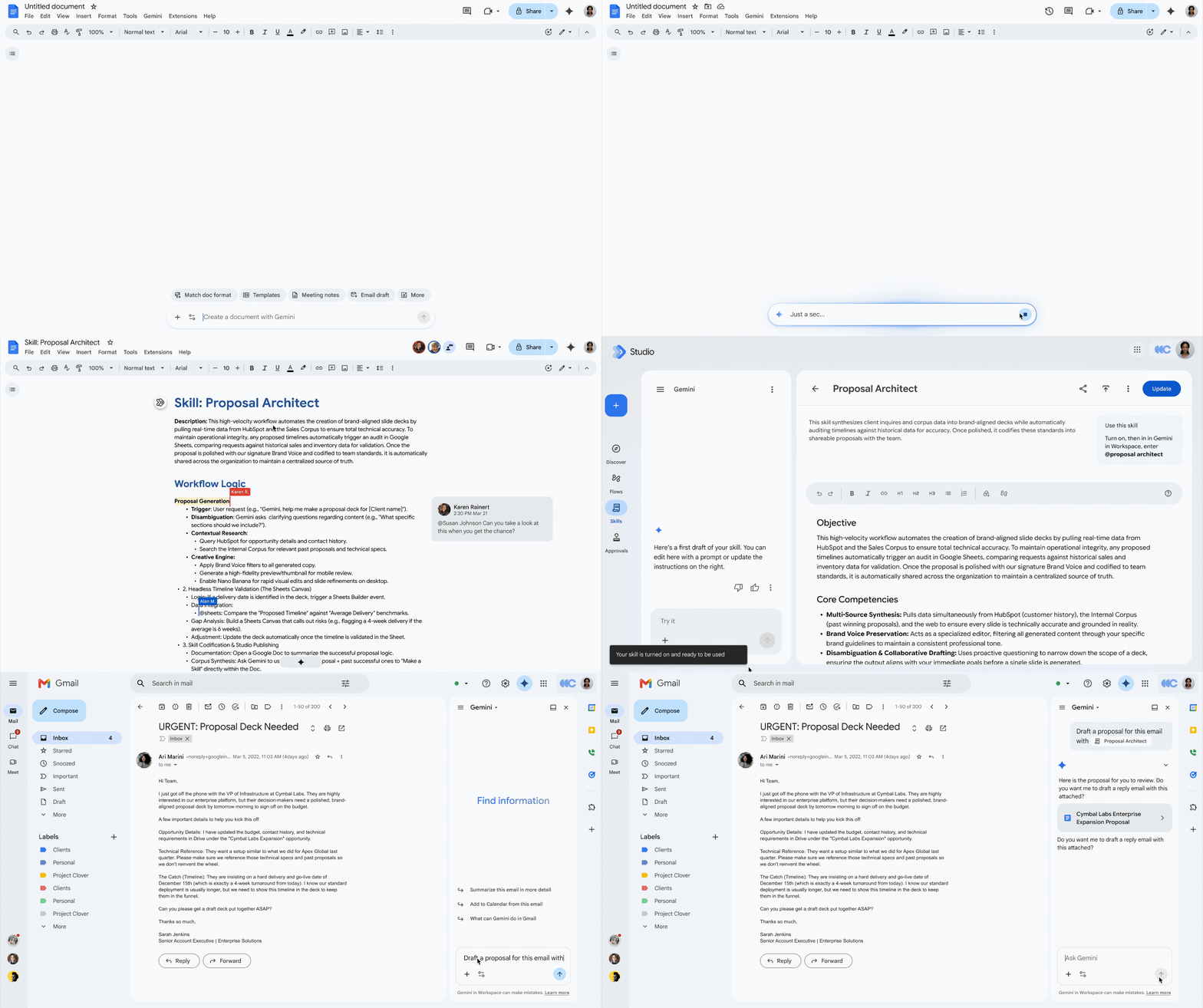
Use skills in Workspace to automate tasks, reuse formatting settings, and scale processes.
Enable additional collaboration with enterprise security controls in Studio Flows: To help users maximize team productivity without compromising security, the Google Workspace team is expanding enterprise security controls to enable additional collaboration scenarios using customizable no-code agentic automation. Workspace admins can now confidently enable and implement agentic capabilities in their organization using these controls, such as:
- Agent access management: in the admin console, admins can view and pause all agents or specific OAuth scopes for specific processes, for example, revoking access to Google Drive on the agent access control dashboard.
- Gemini Data Loss Prevention (DLP): Gemini DLP restricts Gemini’s ability to access Google Drive data based on content conditions and labels; support for additional services is coming soon.
- Studio Data Loss Prevention (DLP): Studio DLP supports restrictions on Studio Flow execution, including blocking or forcing end-user review, based on output data conditions, used data, and output data visibility.
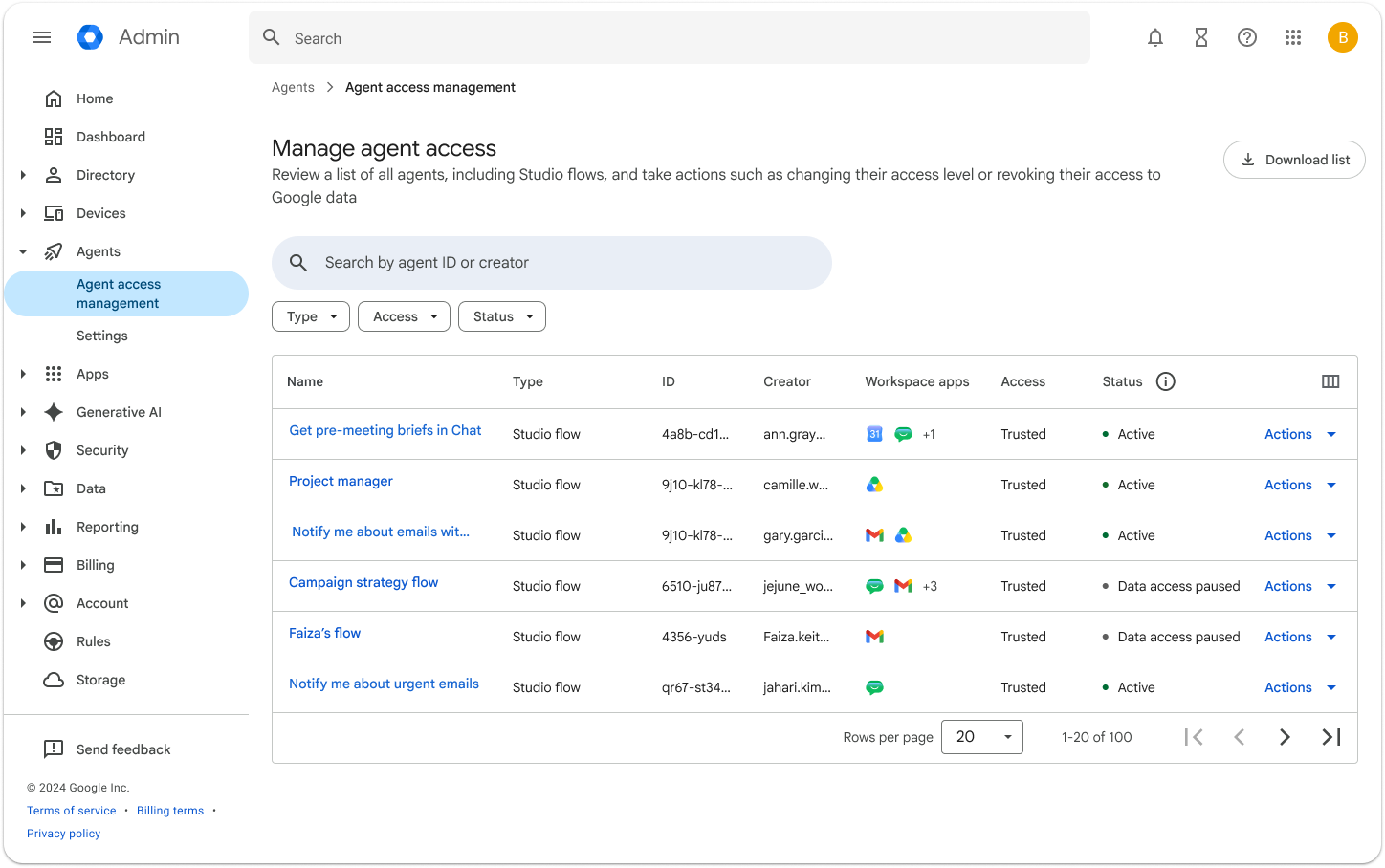
The agent access management dashboard in the admin console provides admins with controls to pause all or individual processes.
Wise IT is an official Premier Partner of Google Workspace! Would you like a free consultation on the platform’s capabilities? Contact our specialists to learn about features, successful organization case studies, and optimal pricing plans for your organization: