
Google Workspace fall updates – everything you need to know

This fall, the Google team added many new capabilities to Google Workspace updates, and the Wise IT team collected all the interesting functions and features in one article!
Here is what’s new:
- Tackle your most ambitious projects: Gemini 3 Pro in the Gemini app.
- Share your most useful Gems with your team.
- Professional-grade image creation: meet Nano Banana Pro in Slides, Vids, the Gemini app, and NotebookLM.
- Create your own visual effects in Google Slides and the Gemini app.
- Get even more useful reports in NotebookLM thanks to new formats that adapt to the topic and content.
- Convert images to video with Veo 3, add a narrator to your videos with AI avatars, and quickly edit videos with new Vids capabilities.
- Use new capabilities to generate a single video from multiple photos in Vids.
- Paraphrase text in your presentations using Gemini in Slides.
- Deeper research and analysis thanks to improved features and Gemini web search in Sheets.
- Make Chat the hub for managing collaboration and workflows with Jira, Lucid, and ServiceNow apps, and use message creation and conversation summaries with Gemini.
- Elevate your team’s collaboration: new Gemini features to improve the meeting workflow: smart meeting scheduling, Meet speech translation, real-time summaries of previous conversation, and integration of Meet chat into the general team chat.
- Take your work with you with Google Drive: AI-powered audio overviews of PDF files and Gemini in the mobile app
- Protect your data with intelligent security features.
Tackle your most ambitious projects: Gemini 3 Pro in the Gemini app for discussing text, images, audio, and video
The Google team is adding its smartest model to date, Gemini 3 Pro, to the Gemini app. This update sets a new level of performance for AI models and provides a more useful service with clearer and easier-to-read answers. Gemini 3 Pro has improved reasoning capabilities regarding text, images, and diagrams compared to previous models, helping to analyze data or generate creative ideas.
Gemini 3 Pro capabilities.
Share your most useful Gems with your team in the Gemini app
Gemini Gems help save detailed instructions and context (for example, documents from Google Drive) for repetitive tasks to save time and focus on deeper and more creative collaboration. Google simplifies the use of these custom experts with shareable Gems for the whole team. Have a specialized Gem for a project or one that helps with a typical team task? Share it with your colleagues, and now every team member will have access to one powerful personalized AI-based assistant.

Share Gems with members of your team to make them powerful team assets.
Professional-grade image creation: meet Nano Banana Pro in Slides, Vids, the Gemini app, and NotebookLM
The Google team introduced Nano Banana Pro (Gemini 3 Pro Image) – an advanced image creation and editing model that provides sophisticated results as well as extended control. Built on Gemini 3 Pro, Nano Banana Pro allows you to combine photos to create high-quality mockups, design promotional materials with clear and accurately placed text, or create detailed infographics with exquisite design.
Nano Banana Pro capabilities.
With Nano Banana Pro in Slides, you can now create stunning infographics, images, and even entire slides — regardless of design skills. With one click, Beautify this slide will turn ideas into compelling visualization that preserves text accuracy, modeling the look and feel based on the presentation as a whole. For more control, use the updated “Help me visualize” sidebar to enter more detailed prompts and select specific output styles (slide, image, infographic), and then refine the results with advanced image editing capabilities. The new infographic option creates attractive content visualizations, combining text rendering capabilities and improved Gemini 3 Pro reasoning methods.
Beautify your slides with Nano Banana Pro in Slides.
Create your own visual effects in Google Slides and the Gemini app
The new Nano Banana model allows you to customize parts of an image while the rest remains in place. It is smart enough to keep a person looking like themselves, even when their location or clothes change.
These generated images can help teams quickly propose different concepts or liven up a team presentation. Thanks to these capabilities in Slides or Gemini chat, you can quickly and easily create and modify images for presentations without leaving the application. For example, you can take an existing product photo and instantly create a new background or place it in a different environment for a social media campaign.

Combine and edit images to elevate your creative and visual assets.
Get even more useful reports in NotebookLM thanks to new formats that adapt to the topic and content
Redesigned reports for NotebookLM have been introduced. Report formats are suggested based on the topic, subject, or information mentioned in the sources. For example, upload various strategic and planning documents for a project, and NotebookLM can suggest a glossary of key information or an explanation of the initiative in a magazine style. Or upload a brief description of a campaign, and NotebookLM can suggest a target audience analysis or a detailed assessment of proposed promotion channels or messages.

Create personalized high-quality documents with updated reports.
Convert images to video with Veo 3, add a narrator to your videos with AI avatars, and quickly edit videos with new Vids capabilities.
Google Vids helps 2.5 million active users tell better stories through video every month. Thanks to Gemini, this app makes video creation accessible to everyone, helping to plan, edit, and polish videos. It can even create original video clips to help tell a story.
Google’s new Veo 3.1 model is now available in Vids and the Gemini app, providing higher video quality with richer sound, better narrative control, and increased realism.
Google specialists also added the ability to convert slides into engaging videos in Vids, supplementing them with scripts, voiceovers, and music.
Creating video in Google Vids from Google Slides presentations.
Another feature available in Vids uses Veo 3 to convert an image into video, helping to turn static product shots into dynamic 8-second video clips.
Veo 3 in Vids can help you convert images to video.
Camera shy? The development team has you covered. Now adding a presenter and narrator to a video has become even easier. Simply enter a script and choose one of the AI-powered avatars from Vids to deliver your message.
Ready for the big (or small) screen? Great. Vids helps easily edit the performance — and sound your best. Thanks to voice recognition capabilities, Gemini generates a transcript, identifies filler words and any awkward pauses, which can be removed from the recording in two clicks.
Bring your scripts to life with AI avatars in Google Vids.
Now you can also edit videos stored on Google Drive directly in Vids, which significantly simplifies working with existing video content.
Use new ingredients-to-video capabilities in Vids
The new feature for creating video from multiple “ingredients” in Veo 3.1 in Vids allows you to create 8-second clips using up to three different images and a prompt. Whether creating a promotional video for a brand, a training video, or an employee onboarding video, you can now create clips with consistent plots, characters, and objects.
Create video clips from images with Veo 3.1 in the Vids section.
Paraphrase text in your presentations using Gemini in Slides
Have you ever found it difficult to find exactly the right text that would stand out on a slide? Now Gemini can help refine text in Slides. Whether you need to shorten a paragraph, adjust the tone, or rephrase a key message, Gemini will help create the perfect narrative in just a few clicks.

Use Gemini to refine text in Slides.
Now you can also create presentations in the Gemini app by specifying a topic to Gemini or uploading a source to Canvas, and it will create slides with the topic and relevant images. They can then be exported to Google Slides to continue refining and collaborating with others.

Create a presentation in the Gemini app.
Deeper research and analysis thanks to improved Gemini features in Sheets
Google helps users get more out of their data in Sheets with Gemini features that help analyze, structure, and format data. Gemini in Sheets now processes complex multi-step tasks from a single prompt — no need to enter instructions one by one. You can ask Gemini to perform several edits at once, for example, “delete all archived rows, apply conditional formatting, and add a Notes column.”
The AI feature in Sheets now supports web search, so Gemini can search the Internet and help research, for example, by finding the latest news about a list of competitors in a spreadsheet. To make these AI features available to more teams, Google is also announcing the expansion of languages for the AI feature in Sheets, bringing this capability to customers using Spanish, Portuguese, Japanese, Korean, French, Italian, or German.
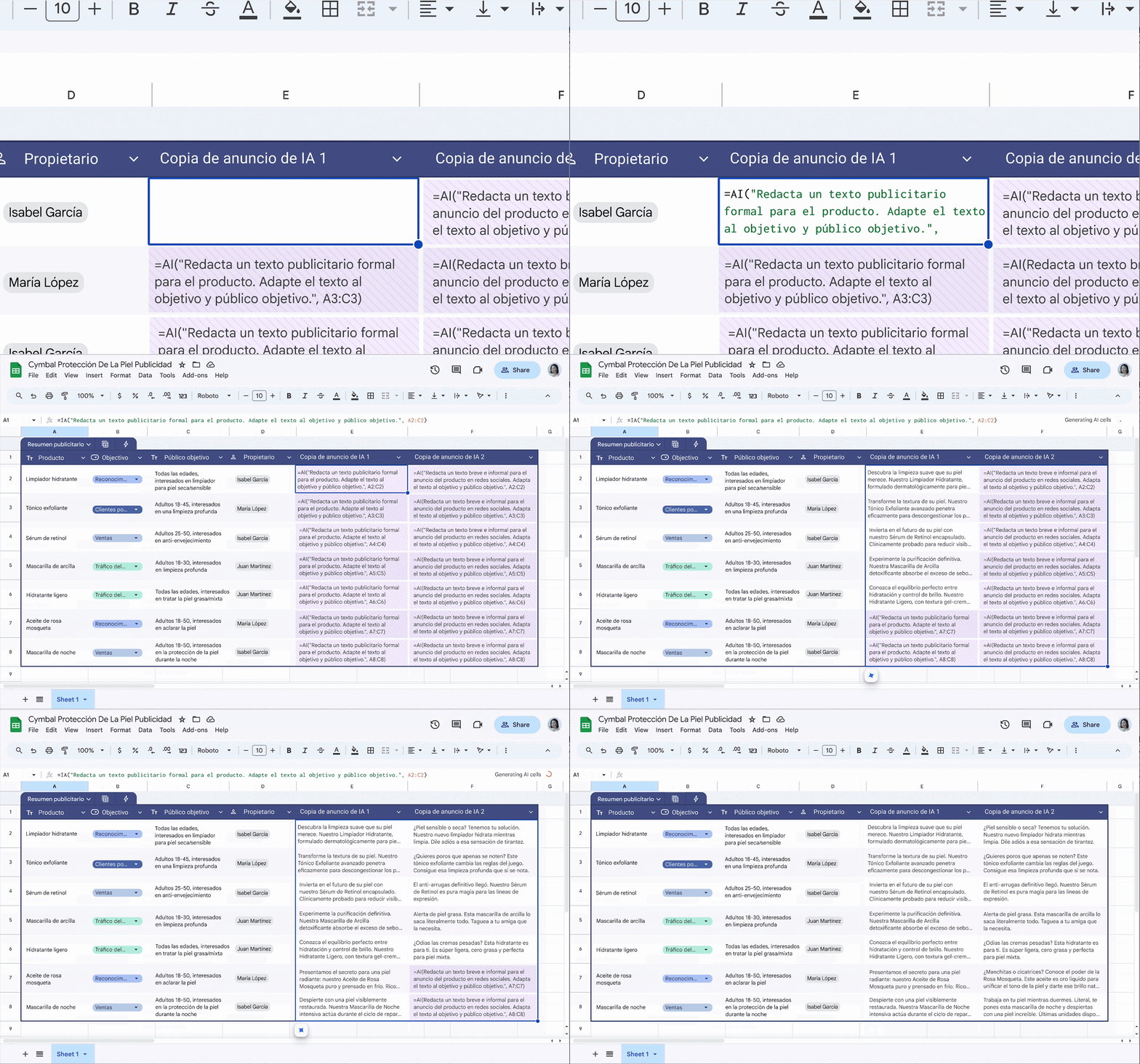
The AI feature in Sheets is available in more languages.
Make Chat the hub for managing collaboration with Jira, Lucid, and ServiceNow apps, and use message creation and conversation summaries with Gemini.
Switching between conversations and mission-critical business apps wastes time and leads to errors. That’s why Google is making Google Chat an even more powerful collaboration hub with several new and improved app integrations that add essential tools directly into the conversation.
- Improved Jira integration: get project updates in real-time and take action on tickets without leaving Chat.
- Lucid apps for Chat: brainstorm and create diagrams together with the team using Lucidspark and Lucidchart directly in conversations.
- ServiceNow for Chat and Sheets: manage IT and HR requests, provide access to knowledge base articles to optimize critical business processes.
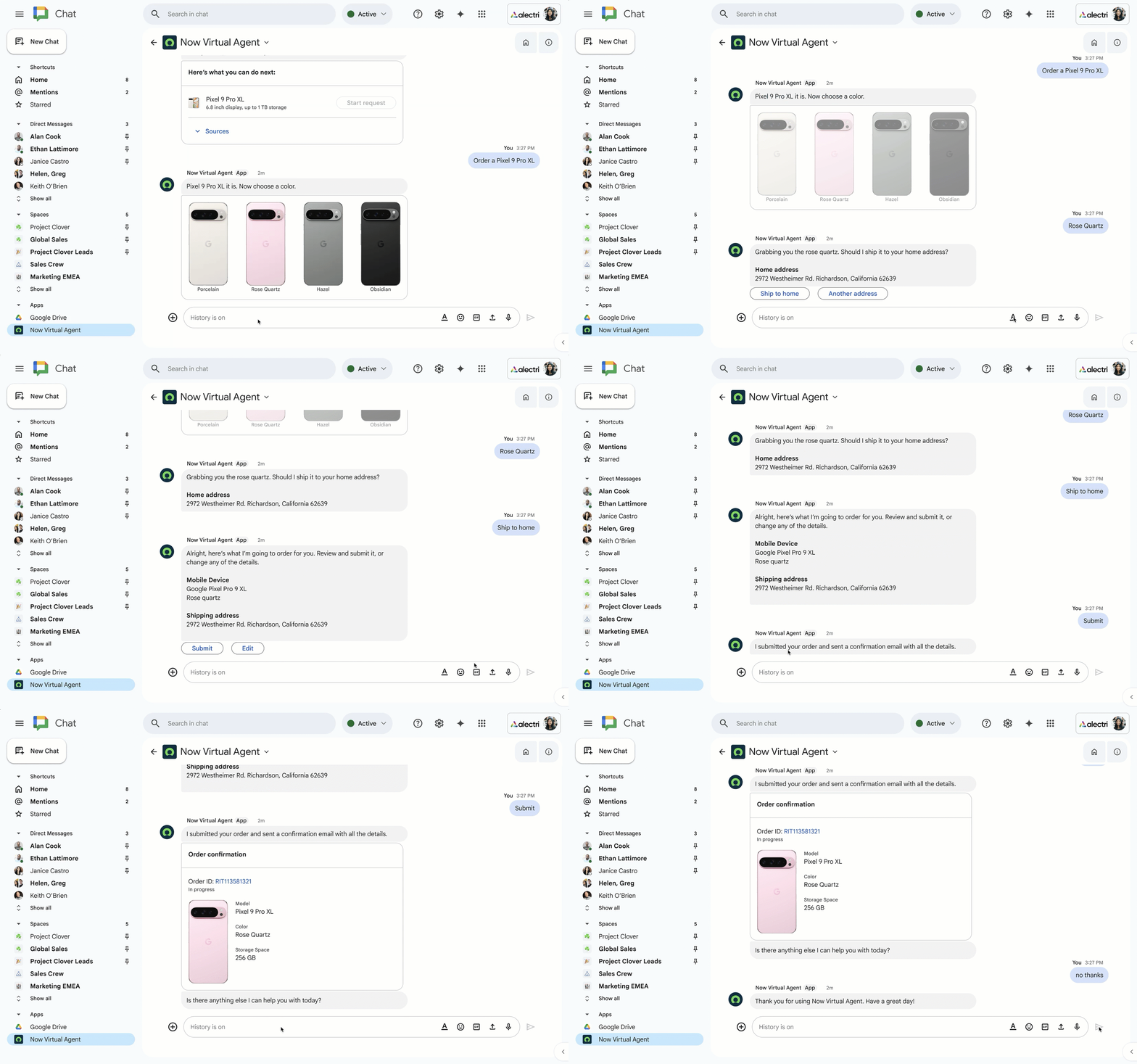
Manage IT and HR requests, approvals, and knowledge base access directly from the chat platform using ServiceNow.
Help me refine my message in Chat: Just like in Gmail and Docs, you can now use Gemini in Google Chat to find the right tone, correct grammar, or make your messages more concise.
On-demand summaries in Chat: Quickly review long conversations. Now you can ask Gemini to provide a contextual summary of the conversation on demand to get key takeaways without reading every message.
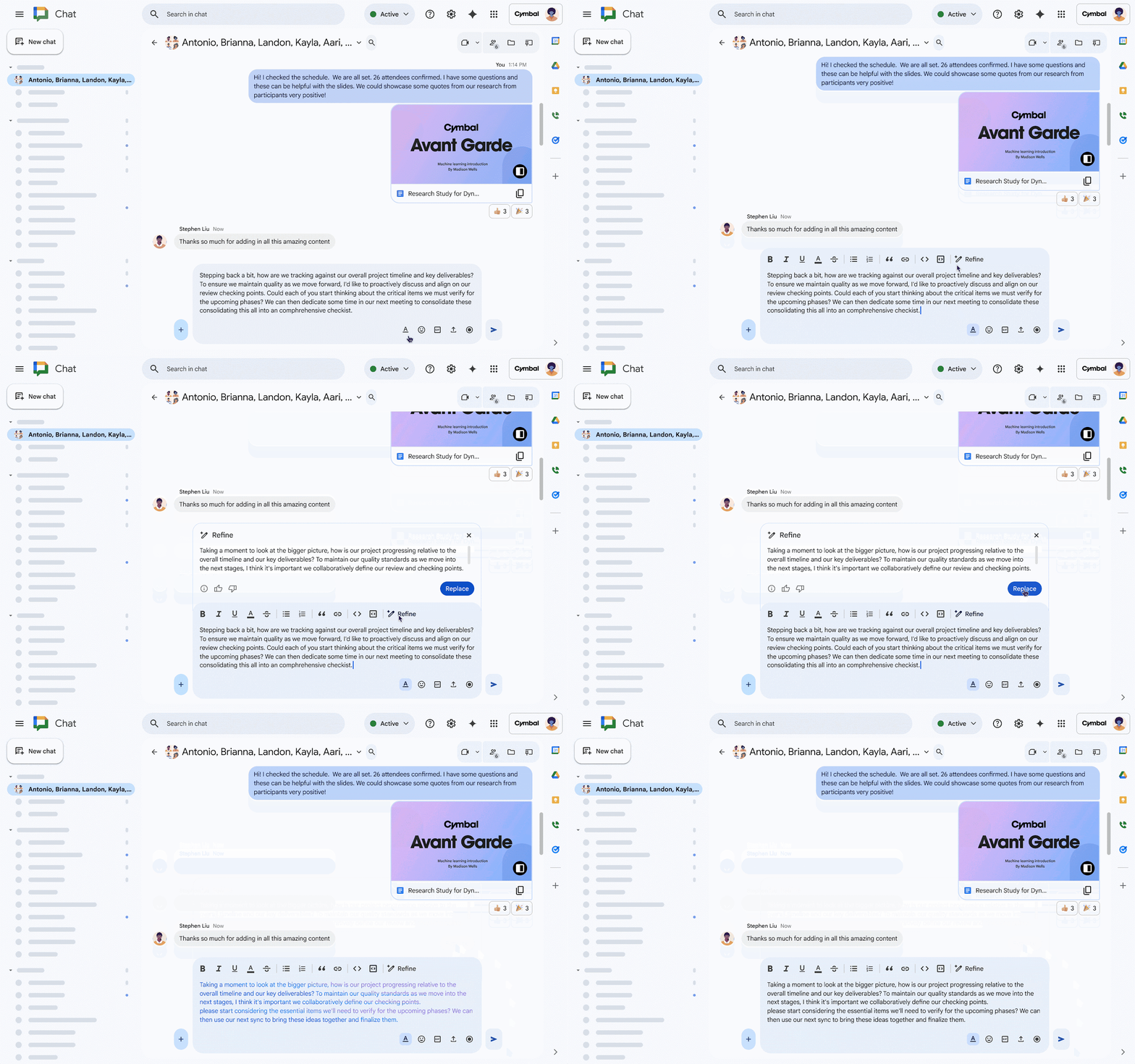
Help from Gemini with refining messages in Google Chat.
Elevate your team’s collaboration: new Gemini features to improve the meeting workflow – before, during, and after.
Google is rolling out powerful new Gemini features in Gmail, Meet, and Chat to make meetings smoother from start to finish.
The “Help me schedule” feature in Gmail will suggest meeting times based on Google Calendar and the context of the email in one step, directly in your inbox.
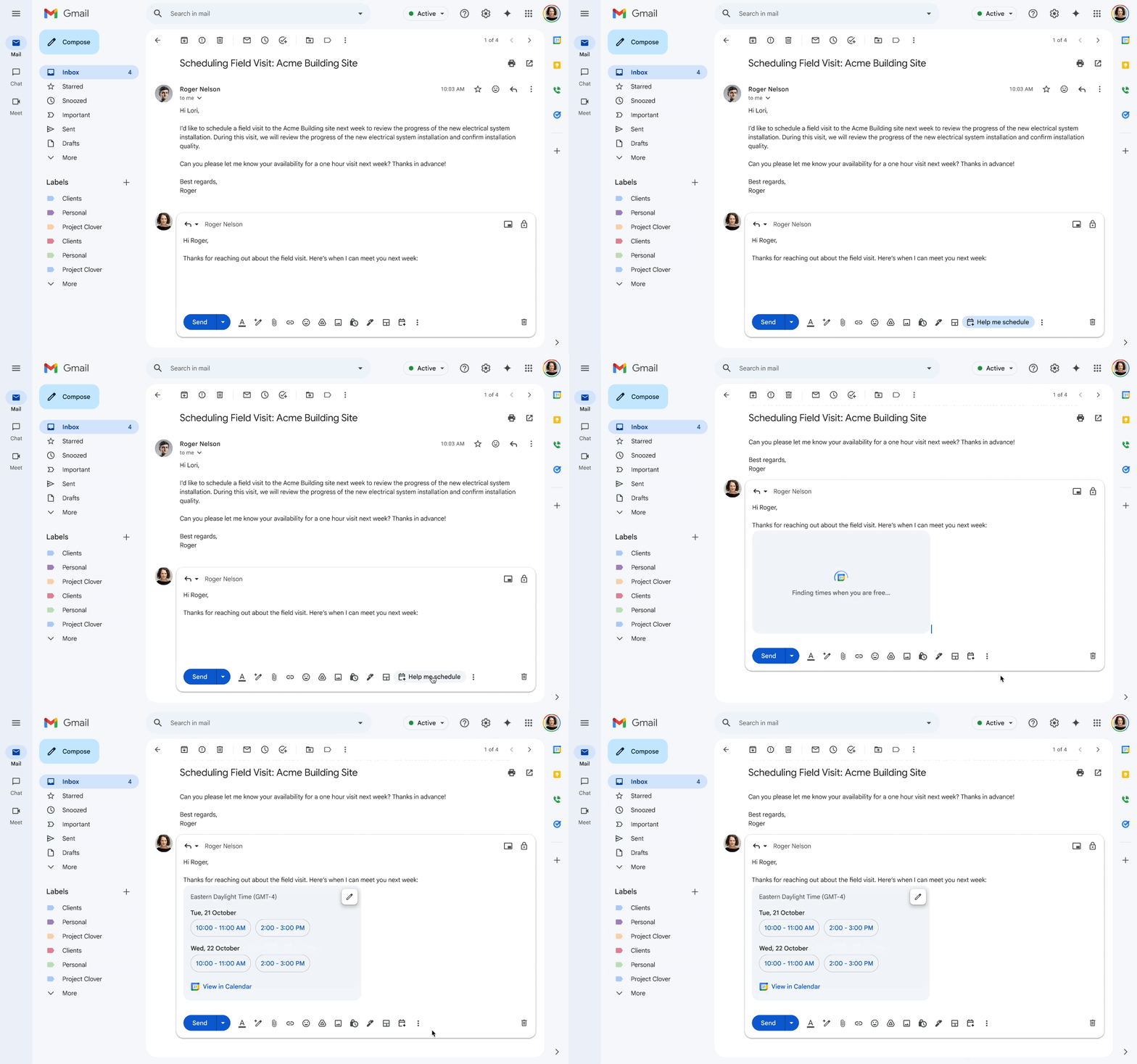
“Help me schedule” in Gmail.
Expansion of speech translation in Meet: Google is expanding speech translation capabilities in Google Meet for business users, providing translation support from and to English, German, French, Italian, Portuguese, and Spanish. This helps break down barriers by automatically translating speech in near real-time while preserving tone of voice and facial expressions. Sign up here for early access.
During the meeting, turn to Gemini in Meet for help in real-time. Gemini will help catch up on what was missed, find key takeaways, or summarize discussion details.
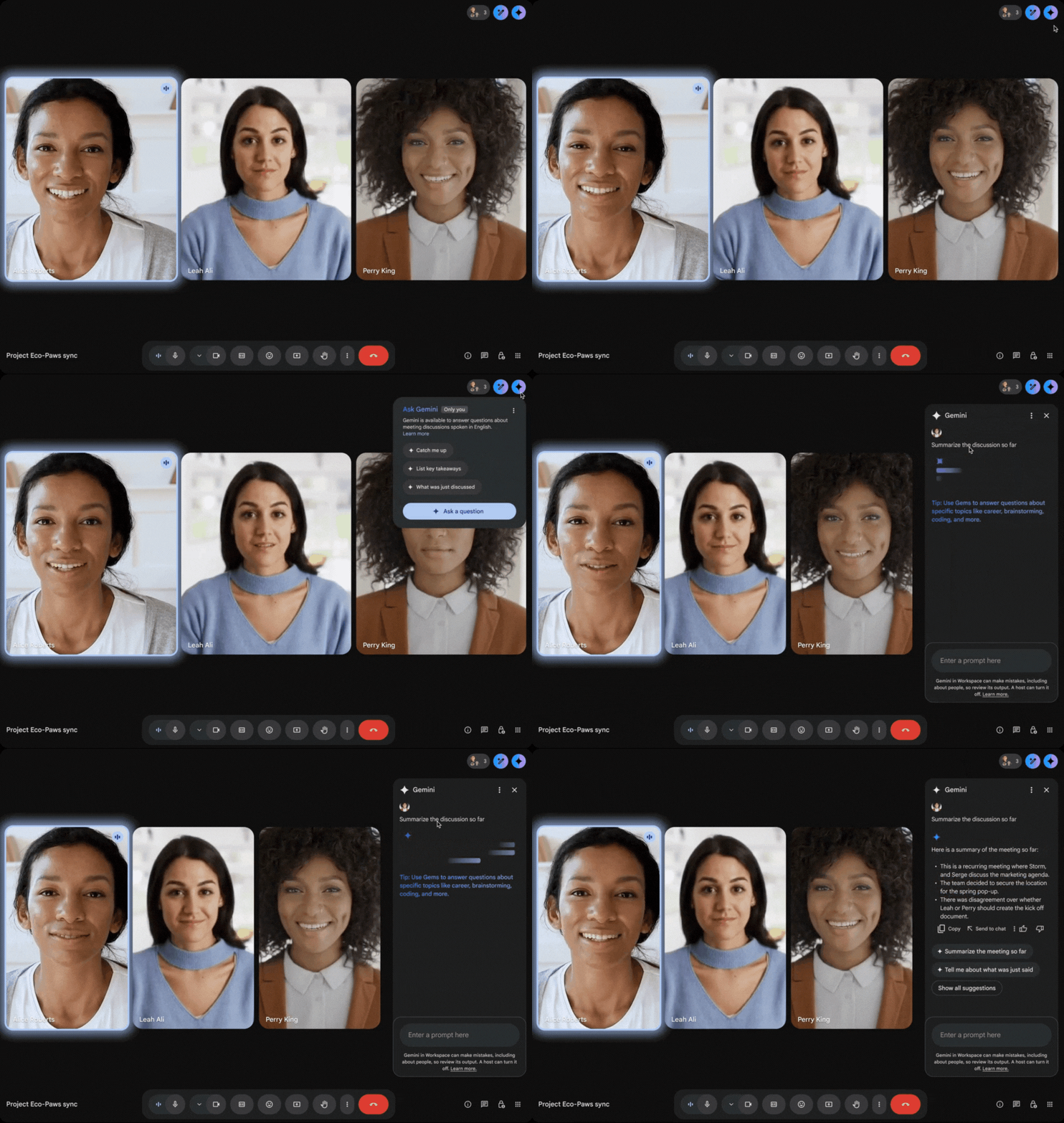
Gemini in Meet provides a summary of the meeting up to this point.
Continuous chat in a meeting combines in-meeting messages and shared artifacts into a persistent conversation in Google Chat, so teams can move from planning to action effortlessly.
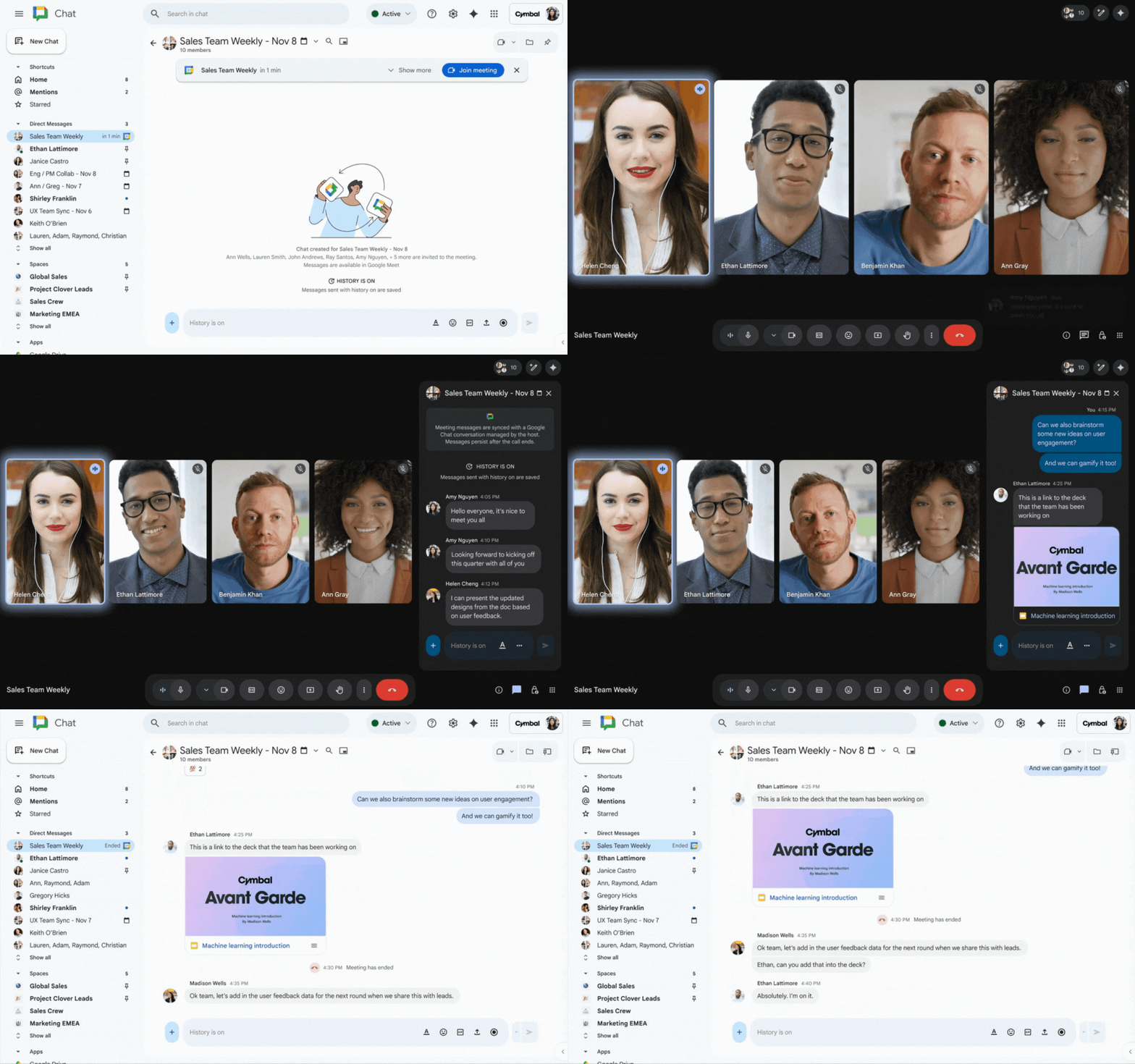
Stay connected after the meeting ends with continuous chat.
Take your work with you: AI audio overviews of PDF files on Google Drive powered by Gemini in the mobile app
You can now use Gemini on Google Drive to convert long, text-heavy PDF files into conversational podcast-style audio summaries. Whether you are commuting, working out, or doing chores, you can listen to summaries from anywhere you have access to Drive files. Once an audio overview is created on a computer, it is automatically saved in a new “Audio Overviews” folder on Drive, from where it can be accessed from any mobile device or desktop computer.
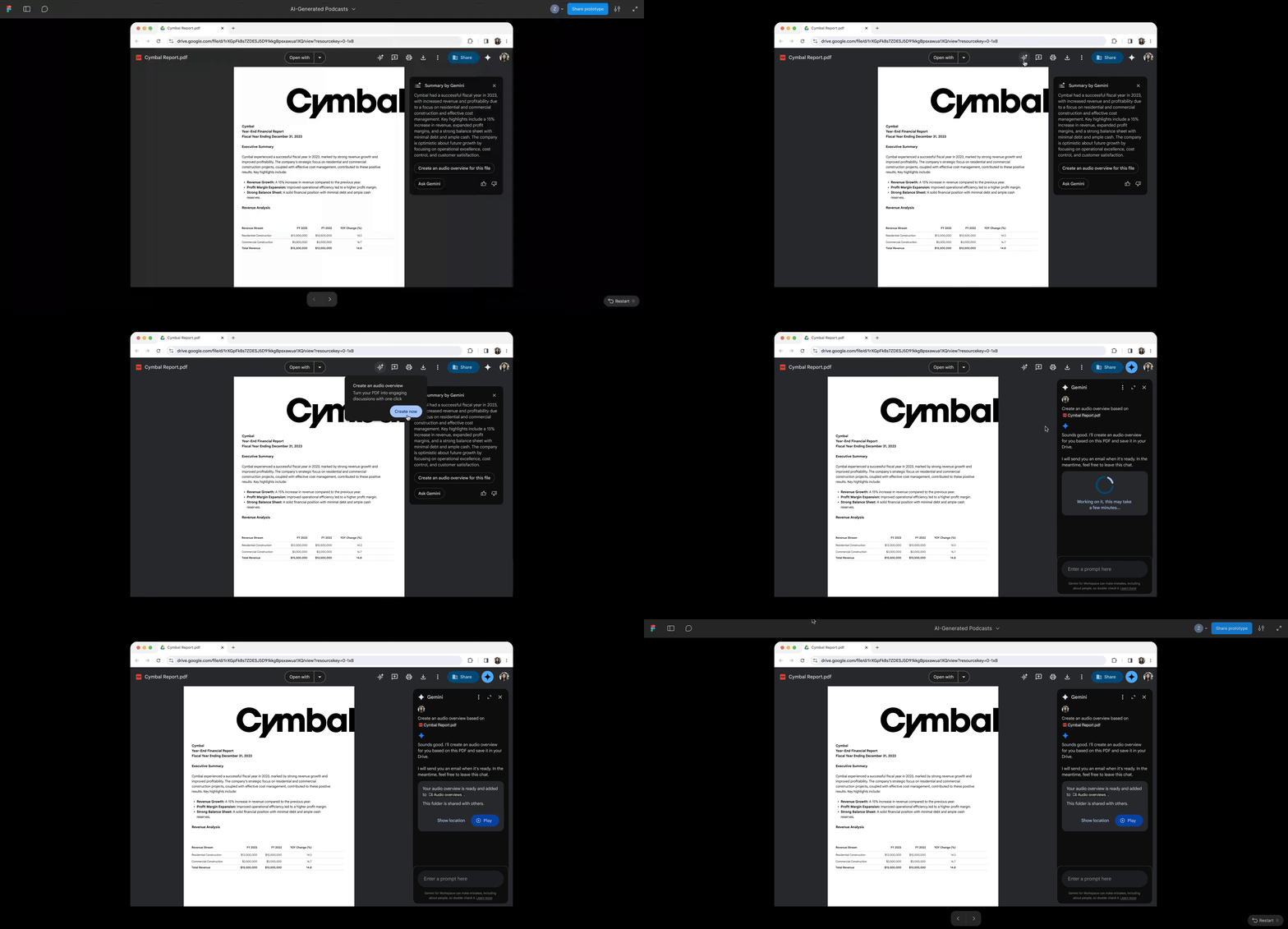
Boost efficiency, improve accessibility, and enhance preparation with audio overviews of PDF files on Google Drive.
Gemini in Drive mobile: Gemini is now available in the mobile version of Google Drive, allowing you to summarize long documents, find quick facts, and get analytical insights about content on the go.
Protect your data with intelligent security features
Protecting an organization’s data is critically important. That is why Google is introducing new AI-powered security features for Drive. To combat ransomware attacks, users with Drive for desktop installed on their Windows and macOS devices will now have the benefit of built-in AI-powered protection for ransomware detection, which can detect suspicious file activity in near real-time and stop syncing user files to the cloud. In the event of an attack, users will be able to use bulk file recovery in Drive to revert corrupted files to their last known safe version, minimizing downtime and data loss.

Block ransomware attacks and recover files on Google Drive.
In Gmail, the Google team is extending security and compliance by allowing users to send end-to-end encrypted emails to any mailbox, including recipients who use another email provider or work outside your organization. This helps ensure that your most sensitive messages remain encrypted and confidential, regardless of who you send them to.
Google specialists are also helping companies become more resilient to risks with a new business continuity plan – a secure and affordable solution that works with Google Workspace alongside Microsoft 365. Designed for Microsoft customers looking to ensure operational continuity during service interruptions, this plan allows customers to maintain productivity during outages using secure and compatible apps like Gmail, Calendar, Meet, and the Gemini app, without the need for migration.
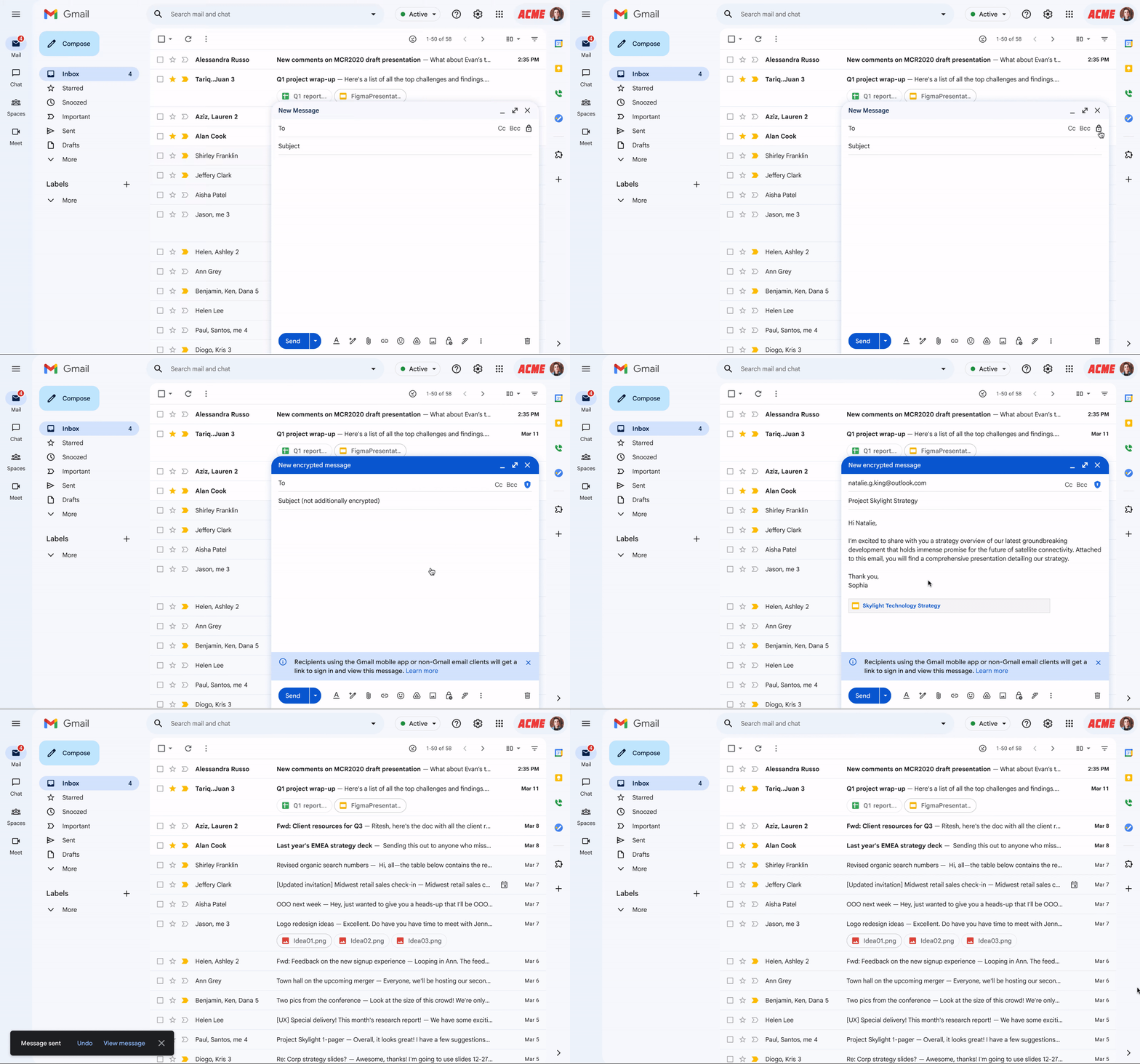
Sending an end-to-end encrypted email to a user who does not use Gmail.
Wise IT is an official Google Workspace partner! Get a free consultation on Google Workspace implementation and a 30-day trial to evaluate the solution: