
Workspace Drops: major updates to the Google Workspace platform

- Slides: create editable slides.
- Vids: create branded videos at scale thanks to avatar updates, music from Lyria 3, and simplified screen recording.
- Sheets: automatically create and edit spreadsheets, detect anomalies in Connected Sheets, solve complex optimization problems, and automate data entry using the “Fill with Gemini” feature.
- Gmail: the “Help me write” feature with personalization. Search faster and smarter with AI Overviews. Simplify meeting coordination thanks to group scheduling.
- Meet and Chat: Better manage your communication channels.
- Docs: go from a blank page to brilliant results using features like “Help me create”, “Help me write” and “Match writing style”.
- Google Meet: get help during meetings in additional languages thanks to the “Ask Gemini” feature.
- Unlock higher productivity and creativity with Gemini Omni in the Gemini app.
- Restore past conversations with Gemini in your Workspace apps.
Create beautiful editable slides in Google Slides
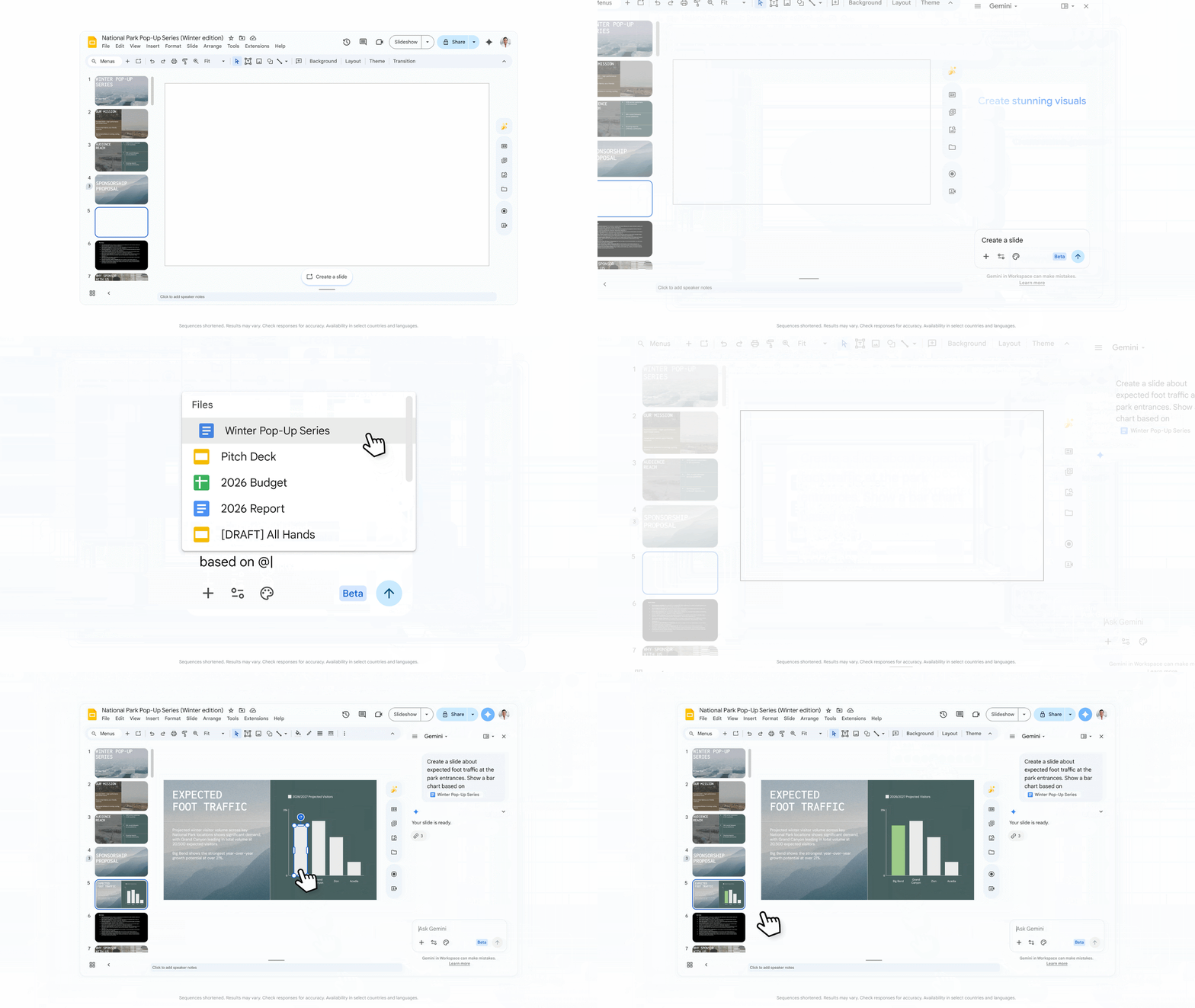
Slide generation just received a major update. Now, Gemini can create fully editable slides that match your brand, using dynamic layouts tailored to specific content. To ensure visual consistency, Gemini securely analyzes your existing presentation and generates a design that aligns with the already established style. You can also manually specify files to be used as a source of content or style, or allow Gemini to automatically find relevant files on your Google Drive. Furthermore, users can now edit existing slides by changing layouts, design elements, or content. To get started, simply click “Create” or “Enhance this slide”.
As before, you can enhance the slide’s look by turning it into an image, but this option is now only available through the “Slide” menu.
Create branded videos at scale thanks to avatar updates and Lyria 3 in Vids
Avatars in Google Vids allow you to scale your screen presence, providing engaging branded messages without the hassle, time, or cost of traditional studio production.
Customize avatars to match your brand: this major update allows you to create personalized avatars to better reflect your company’s identity and engage your audience. This includes detailed controls over the look, clothing, and background of your avatar. Whether you need a polished avatar in a tuxedo or a casual speaker in a branded zip-up hoodie, your avatars will now look the part.
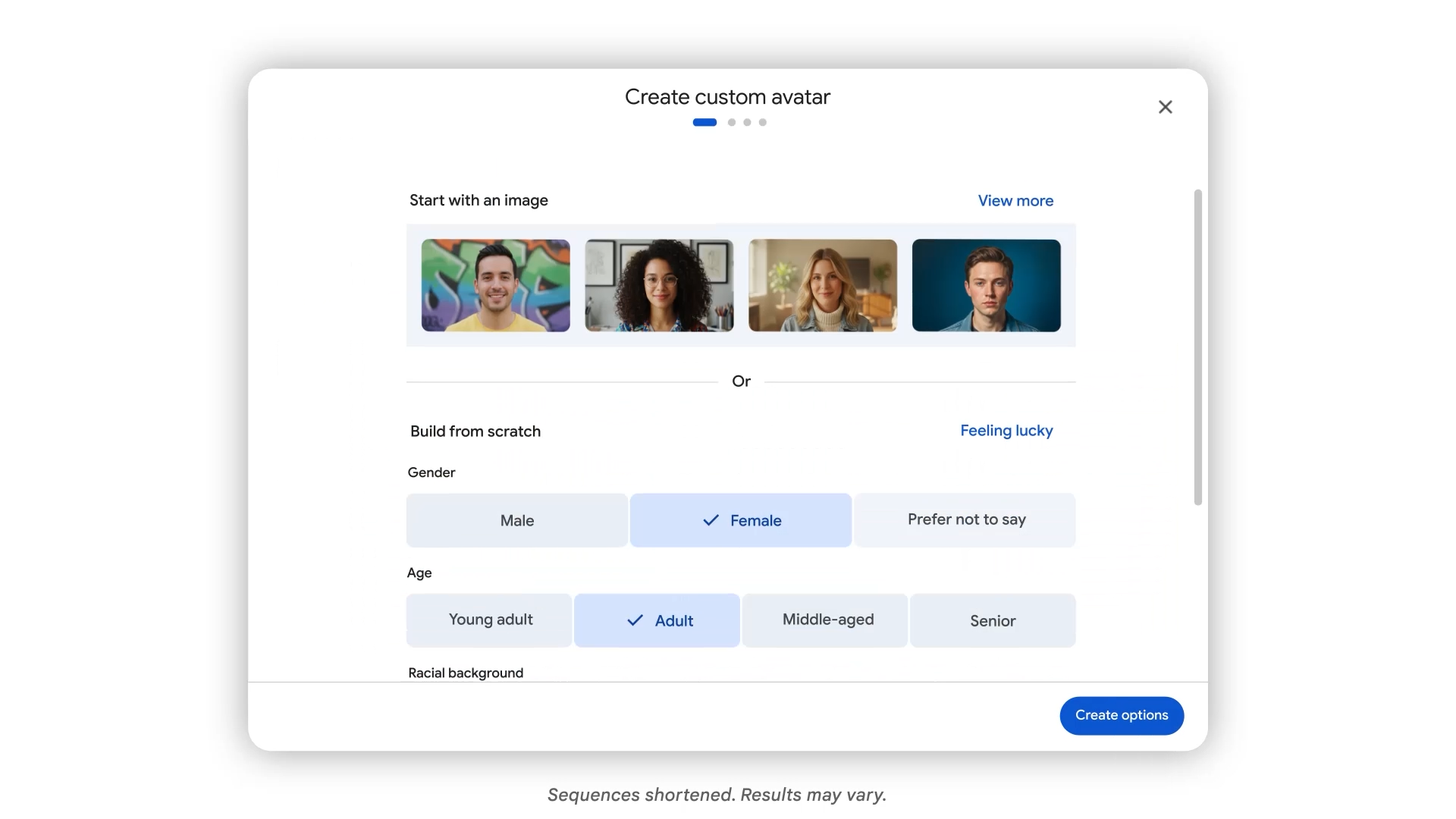
Direct avatars with precision: Now you can go beyond static talking heads and take full directorial control to create more immersive clips with your avatar. Thanks to Veo 3.1, you can place avatars into specific scenes and have them interact directly with objects. Upload your product image and a matching background to showcase your brand while maintaining a consistent face and voice across every frame.

Interact using cartoon avatars: engage your audience with new 2D and 3D cartoon-style avatars from the Google team. These expressive options create an approachable and relatable speaker for the audience, making them perfect for presenting casual project recaps or keeping students’ attention on complex educational concepts.
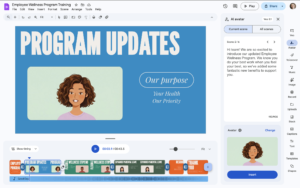
Cartoon avatars in Google Vids.
AI Voiceovers: New AI voiceovers in Google Vids powered by the new Gemini 3.1 Flash speech synthesis model now include 30 new conversational options designed for greater realism and natural expression. Breathe life into these new voices in your next video project by adding emotional cues like “Read this as if you’re excited”, tempo adjustments like “[pause]”, or sound effects like “[laughter]”.
Language Support: currently you can generate avatars in eight languages: English, French, German, Italian, Japanese, Korean, Portuguese, and Spanish. AI voiceovers in audio format already support 24 languages, including Ukrainian.
Instantly record your screen: quickly record your screen from any browser window using the new Google Vids Screen Recorder Chrome extension. Instead of opening Google Vids to access the recording feature, you can now start recording in a single click directly from the Chrome extensions toolbar.
Generate your own music to match the mood of your videos: give your videos more energy with original music that perfectly matches their tone. Thanks to Google’s advanced music generation models, Lyria 3 and Lyria 3 Pro, you can now create anything for your projects — from short clips (around 30 seconds) to longer tracks (up to three minutes). Whether you need a dynamic intro for a product presentation or a background ambient track for a marketing summary, you can easily create a track that hits the right note.

Find valuable insights faster by converting raw data into tables in Sheets and detecting anomalies in Connected Sheets
Instantly create tables from raw data in Sheets: manually formatting unstructured data in a spreadsheet can be a tedious and time-consuming task. Now, when you paste content such as unformatted text, bulleted lists, or JSON into Google Sheets, a “Convert to table” button appears. With a single click, Gemini structures your content into organized tables, freeing you from manual data entry and formatting so you can focus on analyzing it.
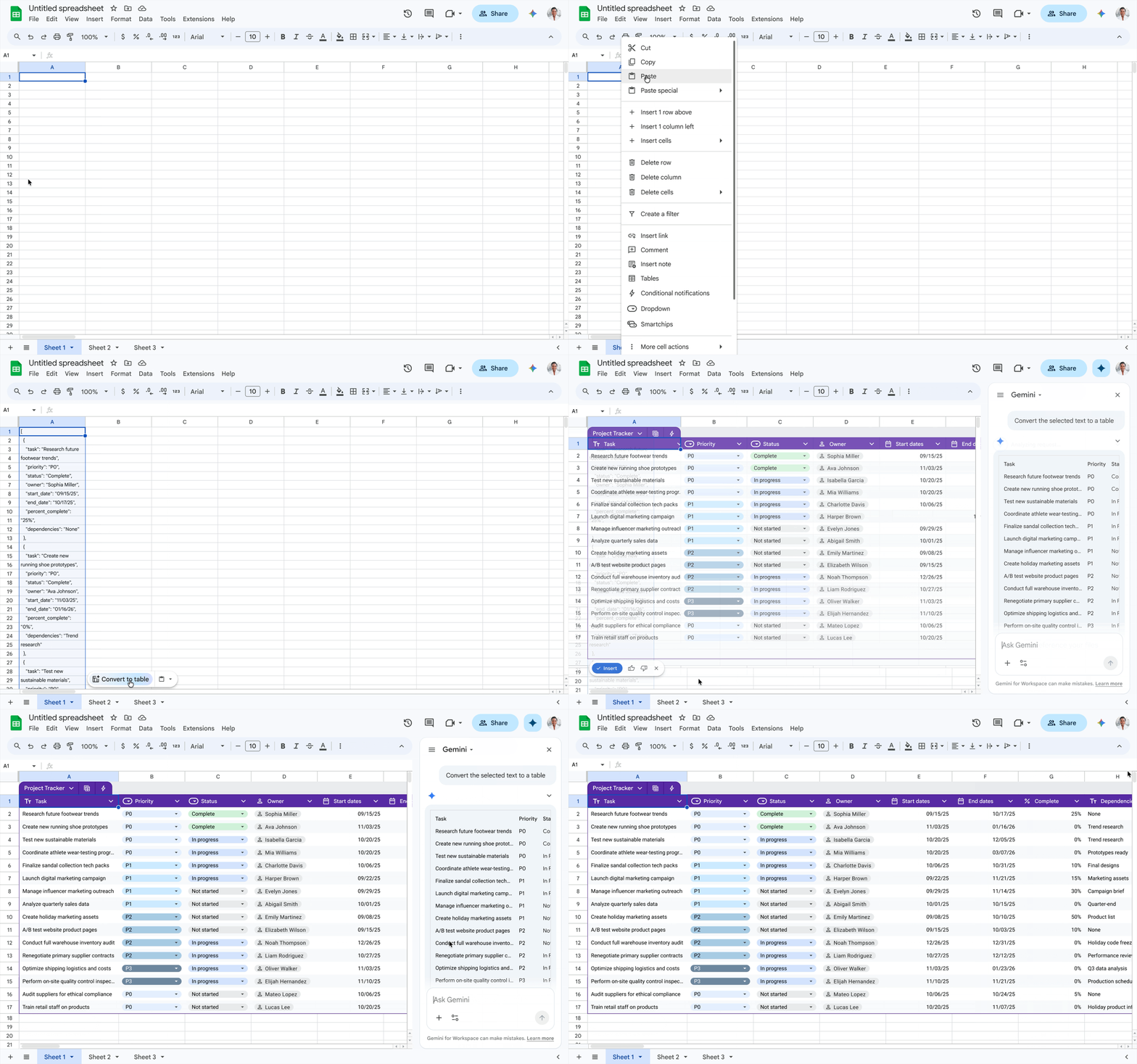
Convert unstructured text into organized tables using the “Convert to table” feature.
Find critical insights in Connected Sheets: Google Workspace experts are also making powerful analysis possible — effortlessly and without specialized expertise — thanks to the anomaly detection feature in Connected Sheets. Powered by BigQueryML and TimesFM, anomaly detection helps identify trends or deviations in your data without needing to manually train a model or learn SQL. Whether you’re trying to detect supply chain bottlenecks or billing discrepancies, anomaly detection in Connected Sheets shortens the path from raw data to actionable AI insights.
Ask your inbox anything: AI Overviews
Your inbox is full of critical information for your work, but finding what you need can be tricky. That’s why the Google team is making the AI Overviews feature in Gmail search available to businesses.
Now, when users ask their inbox a question, Gmail uses Gemini to generate a simple AI Overview with the answer. You can ask natural questions like “What is the current status of the contract with Acme?“ Gemini synthesizes information from across all your email threads and provides a clear, concise answer, saving you from needing to be a search expert just to find a single detail.
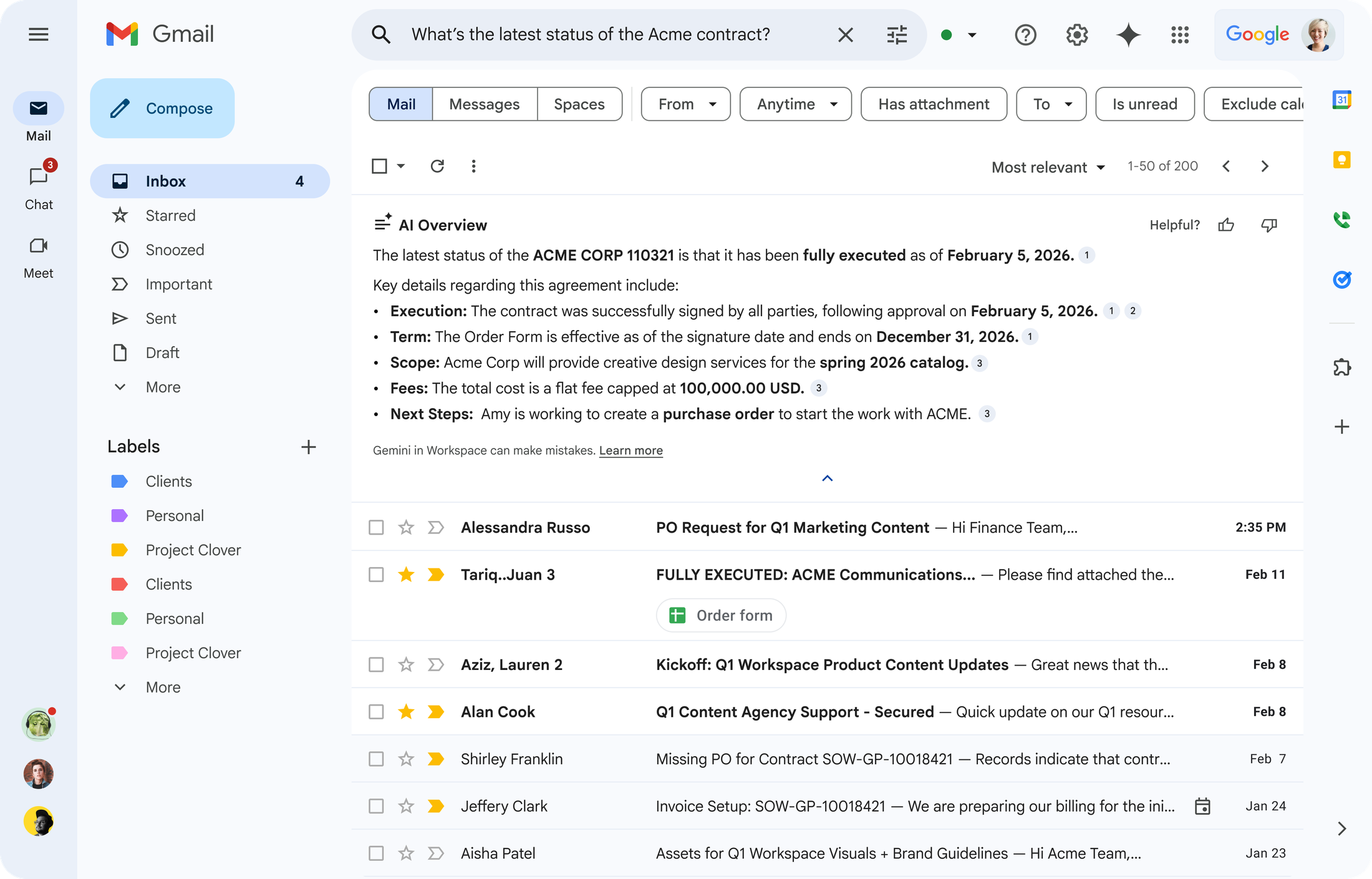
AI Overviews in Gmail
Get tasks done faster: “Help me write” with personalization
The Google team is improving drafts in Gmail by automatically bringing in a broader context of your work, saving users from having to hunt for details manually. Now, Google’s “Help me write” feature can use your past emails, chats, and Drive files to generate email drafts that include relevant details while matching your personal writing style, delivering a significantly better result.
For example, imagine you need to update your manager on a project’s status. Instead of searching for information across various documents, presentations, and conversations to draft a reply, you can simply prompt: “Write a quick project status email to Aisha for the Spring Thaw Tour national parks series.” Gmail, via Gemini, will then pull supporting details from relevant emails, chats, and Drive files to assemble a detailed and accurate response — complete with dates and budgets — ready for your review.
“Help me write” feature with personalization in Gmail.
Simplify meeting coordination with group scheduling in Gmail
Finding a common meeting time for a group of people requires a lot of coordination. Previously, the “Help me schedule” feature in Gmail was limited to one-on-one meetings, but now it can help schedule meetings for groups. When Gemini detects that you are trying to organize a meeting, a button appears in the toolbar offering times that work for you and your colleagues. Thanks to the “Help me schedule” feature, you can focus on preparing for meetings rather than managing the logistics.
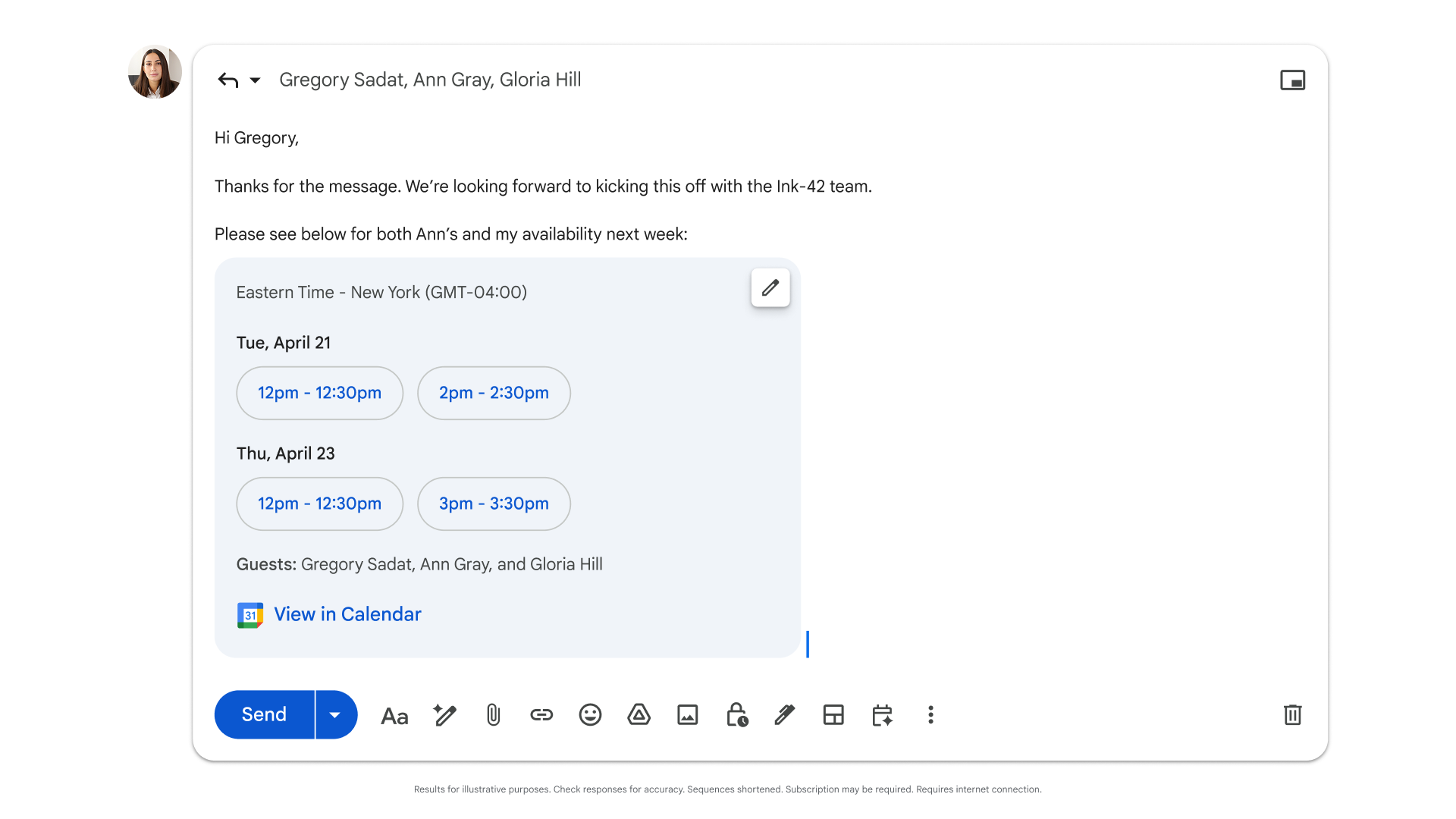
Coordinate meetings with multiple guests using the “Help me schedule” feature in Gmail.
Seamlessly manage your communication channels in Meet and Chat
Customize your AI-generated meeting notes: take full control of how your meeting recaps are captured with the enhanced “Take notes for me” feature in Meet. Now, you can customize your notes in real-time, using an in-call menu to enable or disable specific sections (“Summary”, “Decisions”, “Next steps”, and “Details”) for the current meeting without altering your default settings. This update also includes a new “Decisions” section, designed to capture and track item statuses like “Agreed”, “Needs further discussion”, “Not agreed”, or “Deferred”. Additionally, the “Summary” section has been optimized, becoming more concise and easy to scan, allowing for a quicker and easier review of the main takeaways.
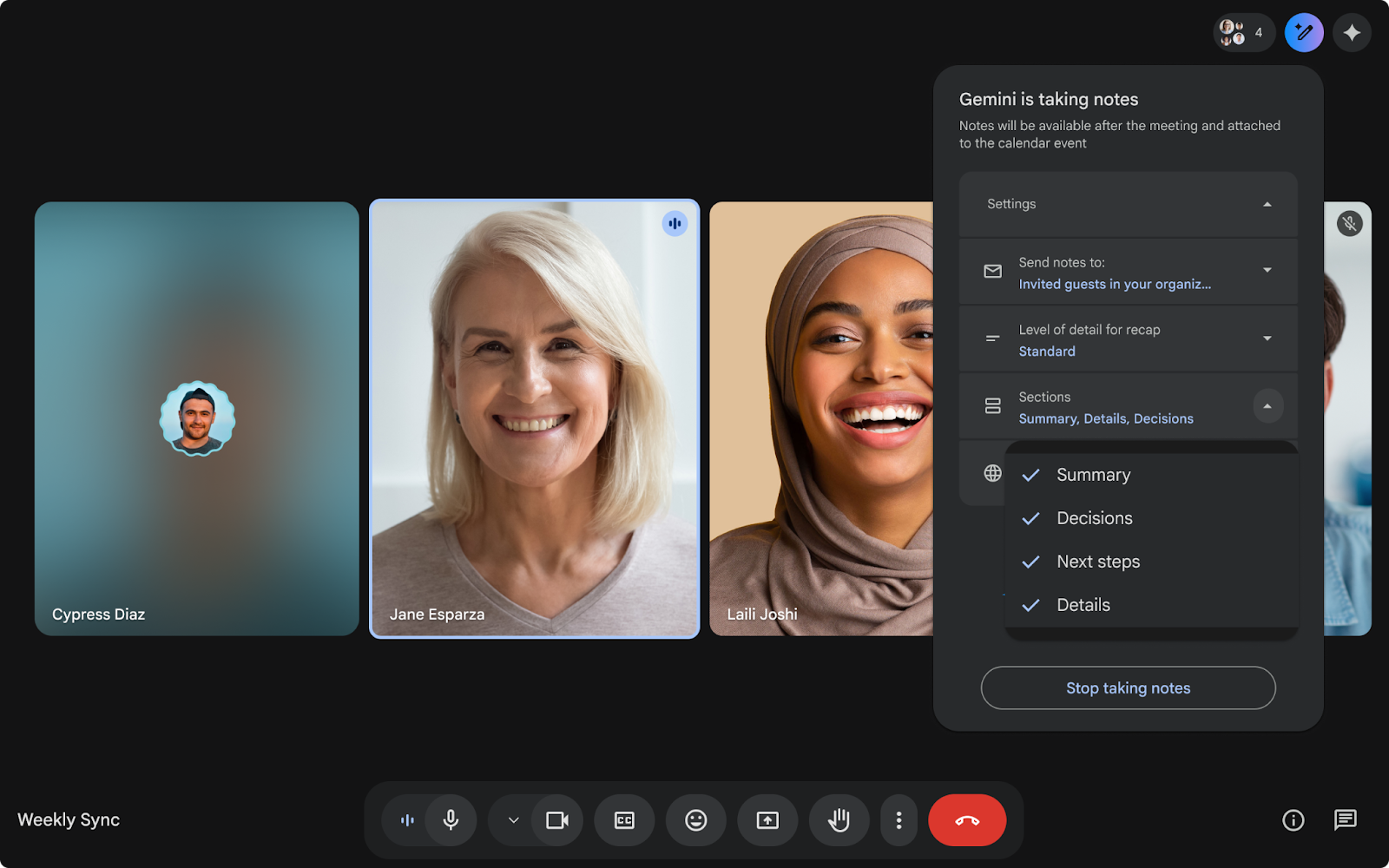
Customize which sections are enabled during a call using the “Take notes for me” feature in Meet.
Get help during meetings in additional languages with the “Ask Gemini” feature in Google Meet
The “Ask Gemini” feature in Meet expands language support, adding French, German, Italian, Japanese, Korean, Portuguese, and Spanish. Whether you need to catch up on what you missed in the conversation or log action items, Gemini will privately answer your questions in your preferred language, so you can stay focused on the meeting without disrupting the flow.
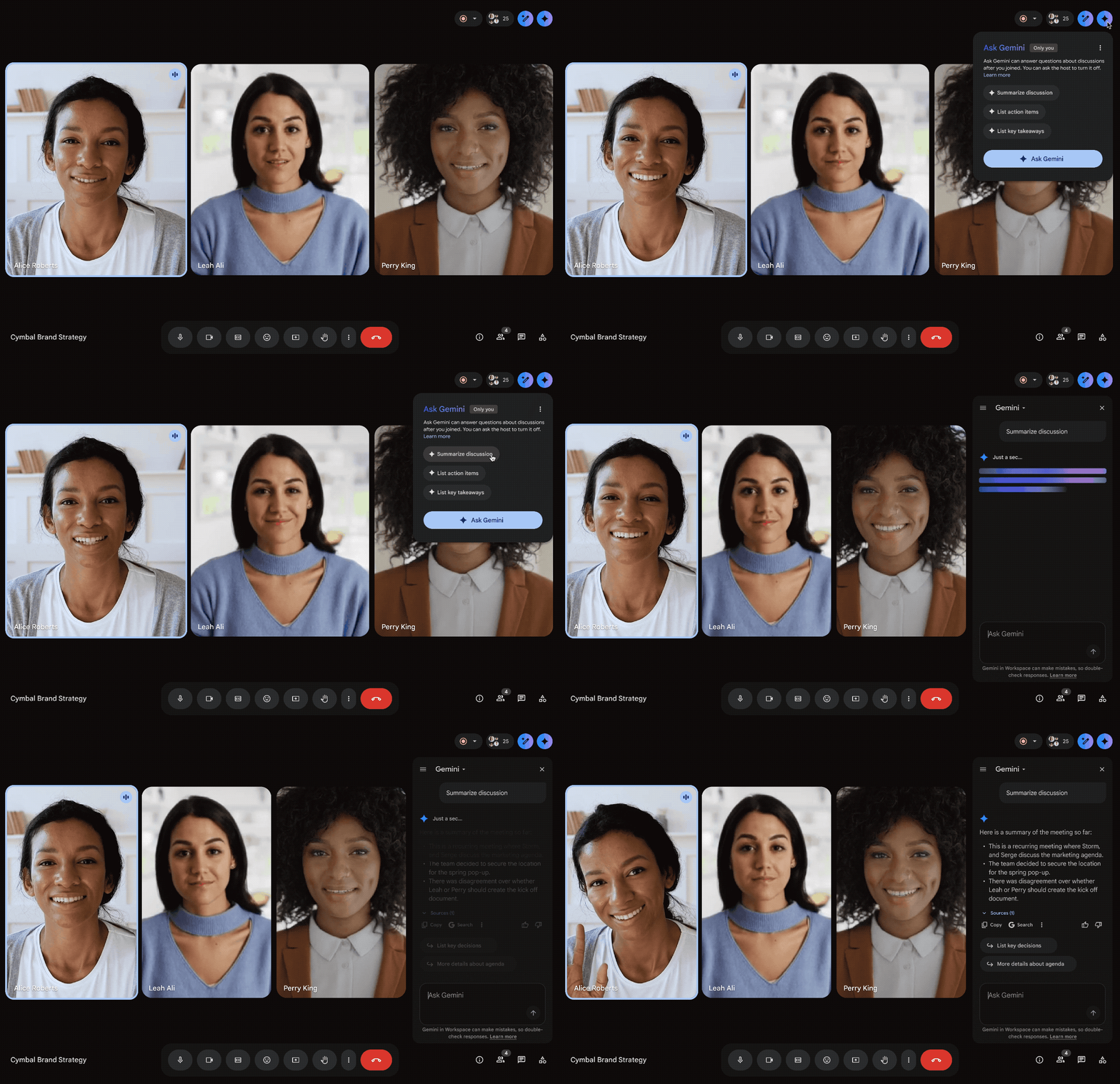
Use the “Ask Gemini” feature in Meet in your preferred language.
Join meetings effortlessly in Meet: Google Workspace breaks down physical barriers to collaboration, allowing users to seamlessly connect to meetings from their personal devices. The “Connect room” feature detects nearby Google Meet hardware and offers to connect instantly, so you no longer need to manually enter a meeting code.
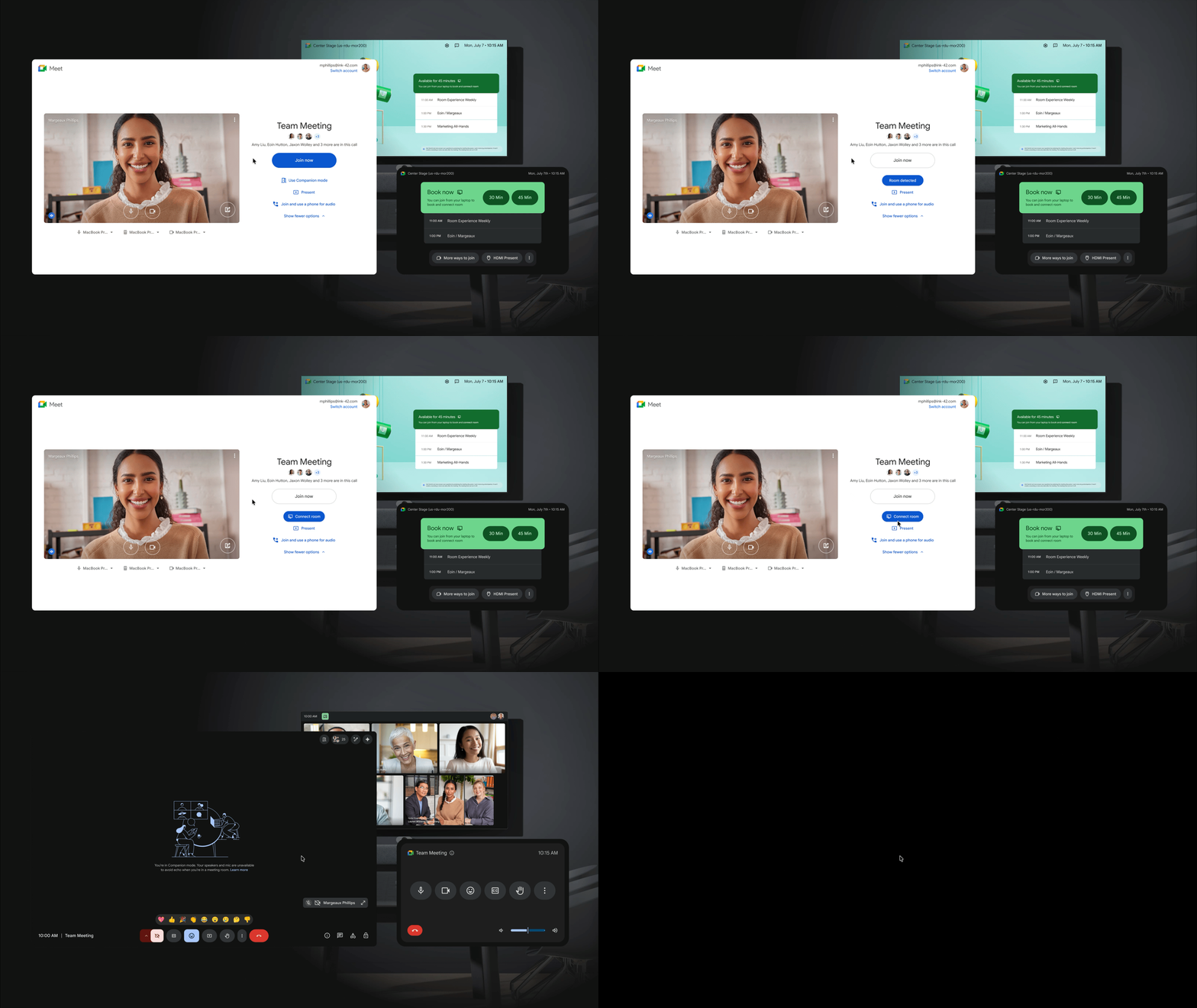
Instantly connect to Google Meet hardware using the “Connect room” feature in Meet.
Overcome language barriers in meetings: in addition to in-person meetings, the Google team is also rolling out speech translation on mobile devices (iOS and Android), which will help international teams communicate more naturally and eliminate language barriers.
Chat securely using guest accounts: Need to safely collaborate and communicate with external stakeholders? Guest accounts allow organizations to share messages and documents with users, partners, and vendors who are not Workspace clients. With guest accounts, organizations can extend their security and data protection policies to these external users. By adding a non-Workspace user to a direct message (DM) or a space in Chat, you can quickly create and provision a new guest account.
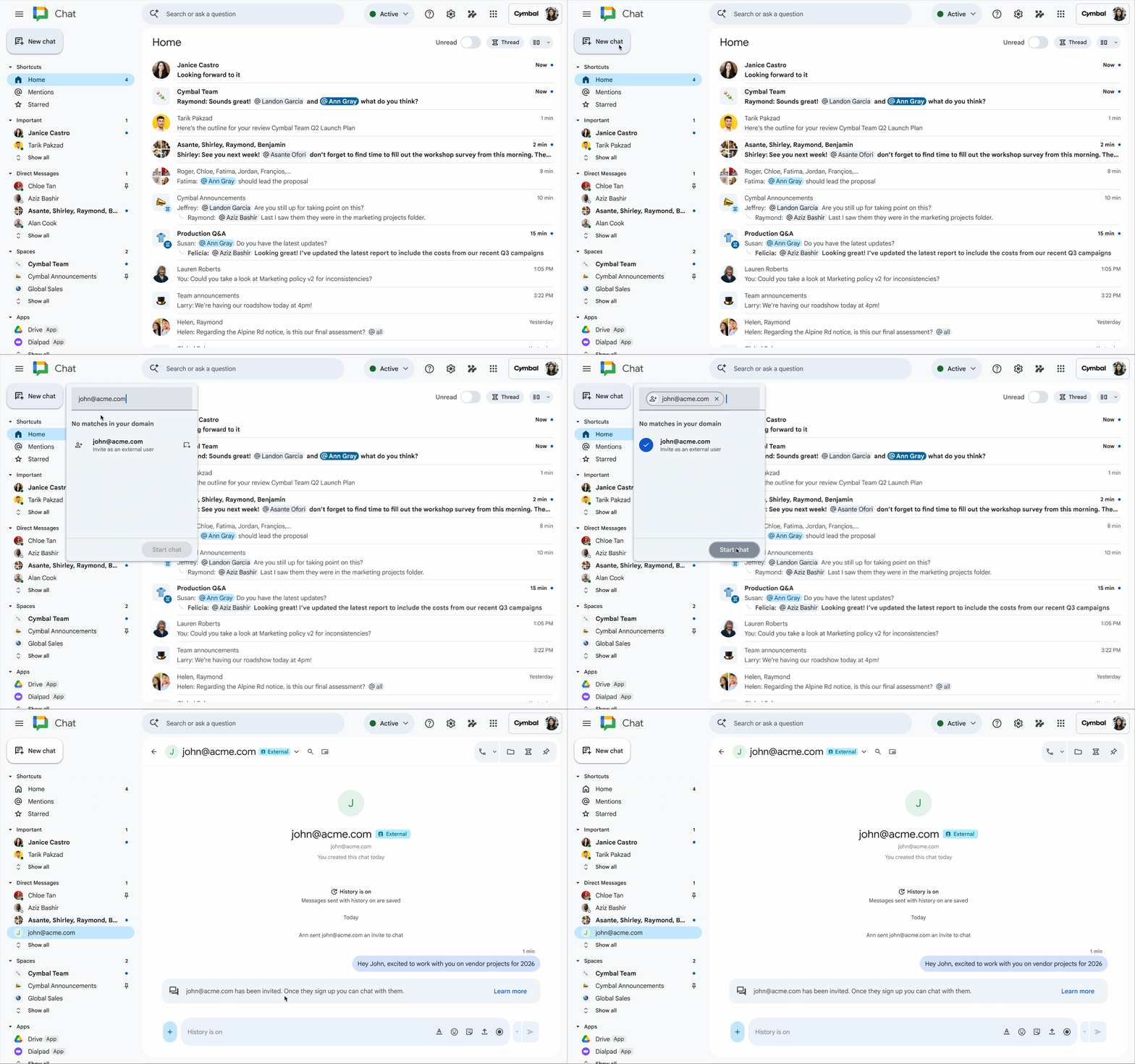
Easily create a new guest account directly in Chat for secure collaboration with users outside of Workspace.
Unlock higher productivity and creativity with Gemini Omni in the Gemini app
Elevate your capacity to create with Gemini Omni, where Gemini’s reasoning power meets the ability to create. Omni is Google’s new model capable of building anything from any kind of input, starting with video. With Omni, you can combine images, audio, video, and text as inputs to generate high-quality videos grounded in Gemini’s real-world knowledge. You can also easily edit your videos using a simple conversation.
Restore past conversations with Gemini in your Workspace apps
Now, Gemini in the side panel of Gmail, Docs, Sheets, Slides, Drive, and Chat supports conversation history, making it easy to review previous answers and pick up right where you left off. Administrators retain full control to ensure data management aligns with your organization’s policies, but your chat history remains completely private to you in each app.
Wise IT is an official Premier Partner of Google Workspace! Want a free consultation on the platform’s capabilities? Contact our specialists and learn about its features, successful organization use cases, as well as optimal subscription plans for your organization: