
Google Workspace Drops: The Most Exciting Updates Since Early 2026

Welcome to Google Workspace drops! The Google team is tirelessly developing the functionality of the Google Workspace collaboration platform. Let’s take a look at the fresh AI features that have appeared in Google Workspace since the beginning of 2026.
Among the updates:
- Take video creation to the next level with Veo 3.1, templates, and stylized captions in Google Vids.
- Get deeper and more relevant AI analytics thanks to new Workspace integrations in the Gemini app.
- Use your working time efficiently with Gemini in Workspace apps.
- Break language barriers for global collaboration with expanded language support in Meet and Vids.
- Optimize your team’s workflows with new apps for Google Chat.
A new level of video creation with Veo 3.1, custom templates, and stylized captions in Google Vids
The Google team is introducing the most realistic AI avatars in Google Vids, which are now powered by the new Veo 3.1 video generation model. This update allows for faster creation of high-quality avatars with more expressive facial expressions, smoother lip-syncing, and more stable framing for a professional look. With updated avatars from Google, users will be able to more effectively engage viewers in training materials, internal announcements, customer instructions, and more, without using a camera or resorting to re-recording.
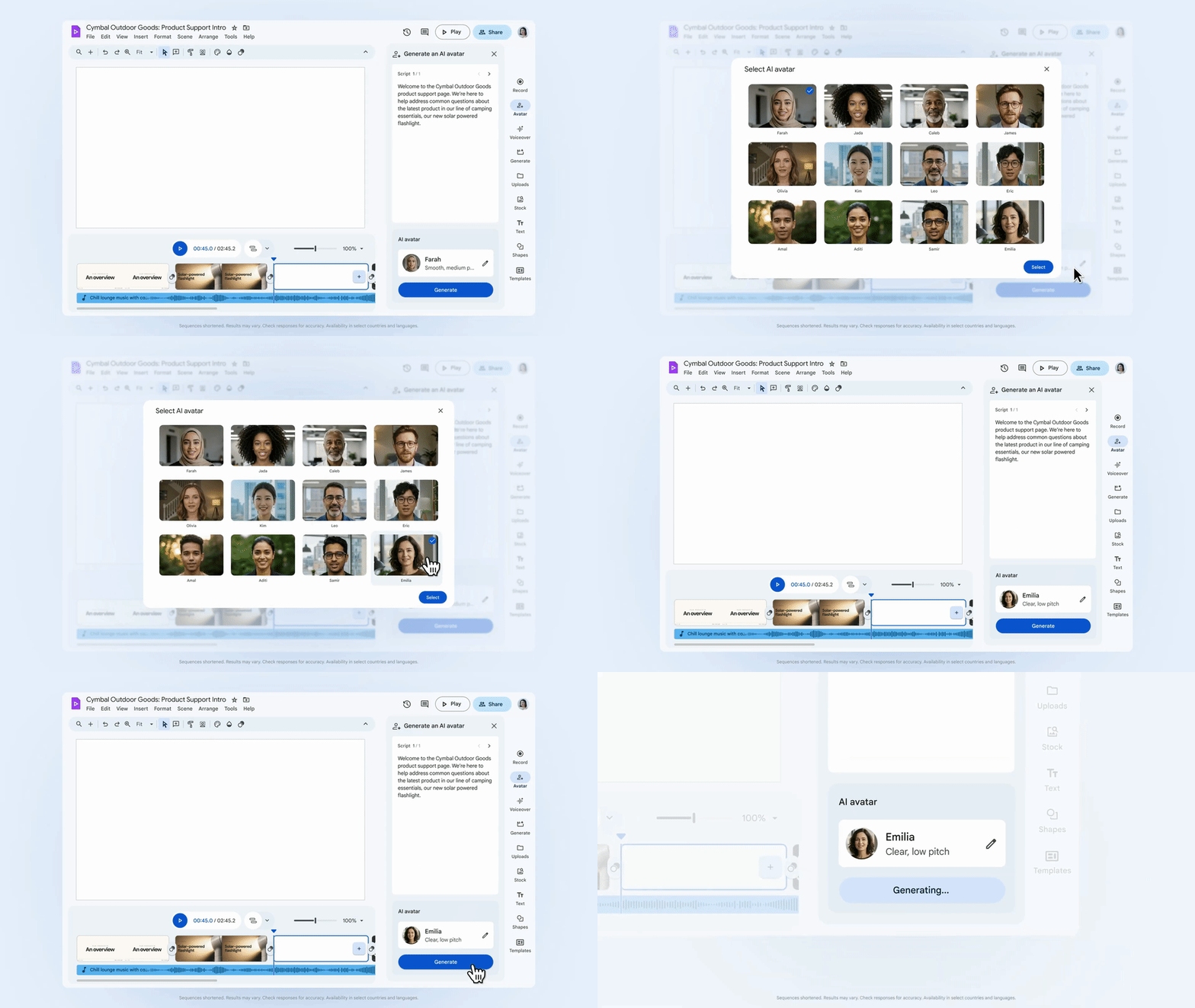
Add professional-level avatars to your workflows in Vids.
The Ingredients to Video feature in Vids has also received an update to help users easily create professional video content in their brand style. Thanks to Veo 3.1, Ingredients to Video can now generate portrait-format clips, providing realistic sound and maintaining the consistency of objects, characters, and backgrounds. Whether “bringing to life” office photos or animating product shots, this update simplifies the creation of vertical videos for social media posts.
Want your videos to match your brand? Just like in Google Slides, Forms, and Sites, administrators can now configure which default templates appear directly in Vids via the Admin Console. Default templates give admins more control over the organization’s branding, and users a professional, pre-approved starting point right in the template sidebar. Google Workspace specialists have also added stylized captions generated based on video content to help create high-quality content even more efficiently.
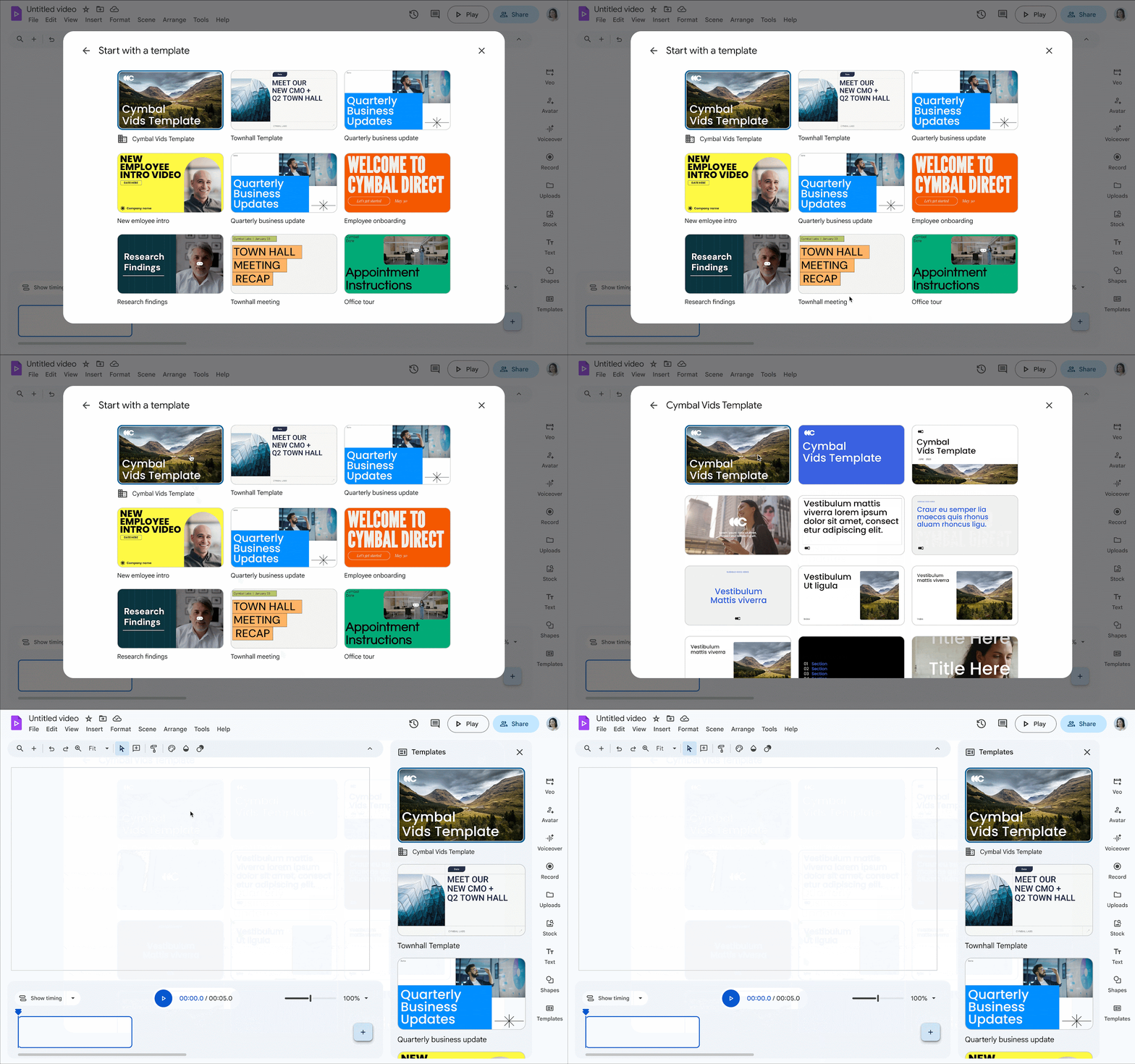
Create high-quality branded videos using custom templates in Vids.
Get deeper and more relevant AI analytics thanks to new integrations for Deep Research in Workspace and Google Chat in the Gemini app
In the Gemini app, you can now ask Deep Research to analyze information from Gmail, Chat, Drive, and Calendar in addition to web sources, making responses more relevant to your work. You can also now select Chat as a source in the Gemini app. Need to find out what decisions were made regarding a specific project last week? Just ask Gemini. It reliably combines chat history and documents to provide an answer based on private work information, not just what is available on the web.
Organizations are already using Gemini and Deep Research for marketing analysis, counterparty checks, procurement automation, and many other tasks! Learn about the best practices for using AI for your business by ordering a free consultation from Wise IT specialists:
Order a consultationUse your working time efficiently with Gemini in Workspace apps
Audio Overviews in Docs: Keeping up to date doesn’t have to mean working longer. With audio overviews in Docs, users can now turn a lengthy report into a quick listen. Simply choose a character (e.g., a mentor or narrator) to generate a short verbal summary of the document. This allows you to prepare for a meeting or catch up on news while on the go.
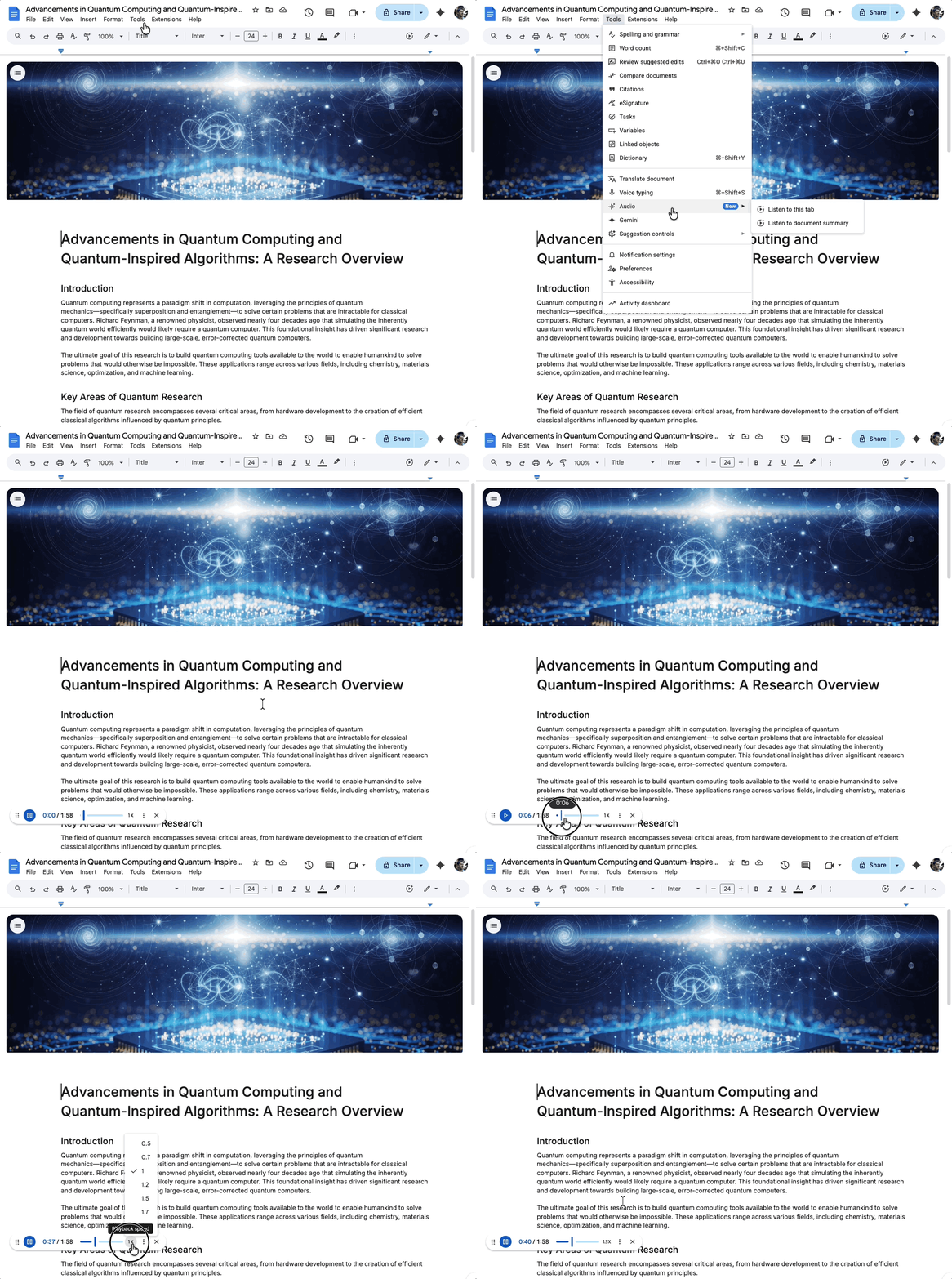
Listen to audio summaries of your documents.
Proofreading in Gmail: To help users get fast, actionable advice on how to improve emails as they write them, Google Workspace experts are introducing proactive proofreading in Gmail. Proofreading offers spelling and grammar fixes, as well as rephrasing for conciseness, using active voice in sentences, improving sentence structure, and word choice so that your draft email is perfectly suited for communication.
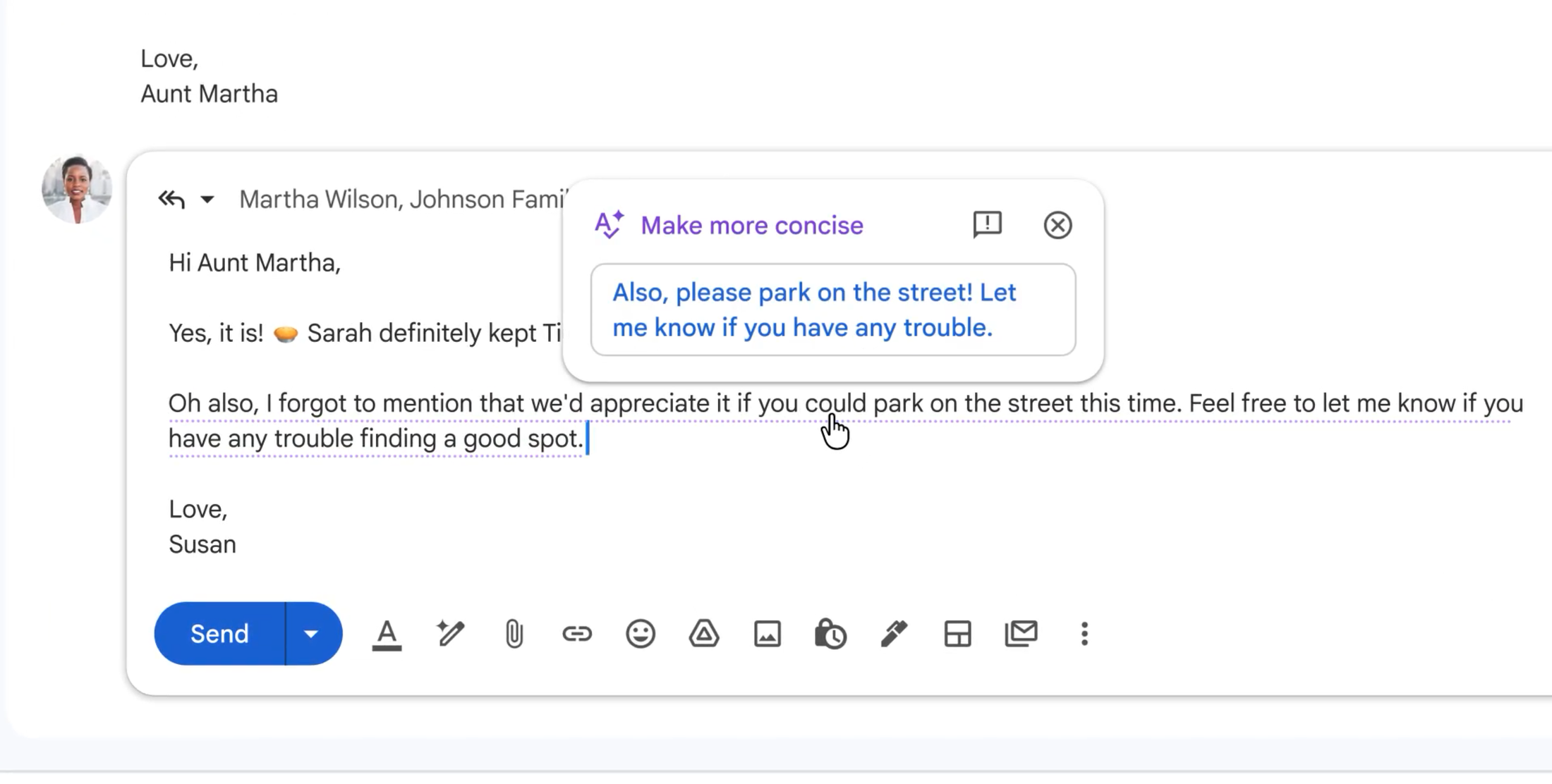
Polish your draft emails with the proofreading feature.
Better time suggestions in Calendar: With Gemini-powered time suggestions for scheduling and rescheduling meetings in Google Calendar, the Google team is removing the friction from meeting logistics. By analyzing each participant’s availability, time zones, and working hours, Gemini in Calendar quickly identifies the best time slots even in busy schedules. If multiple participants decline an invitation and a meeting needs to be rescheduled, a banner will appear with a time when everyone is free, allowing the invitation to be updated with one click.
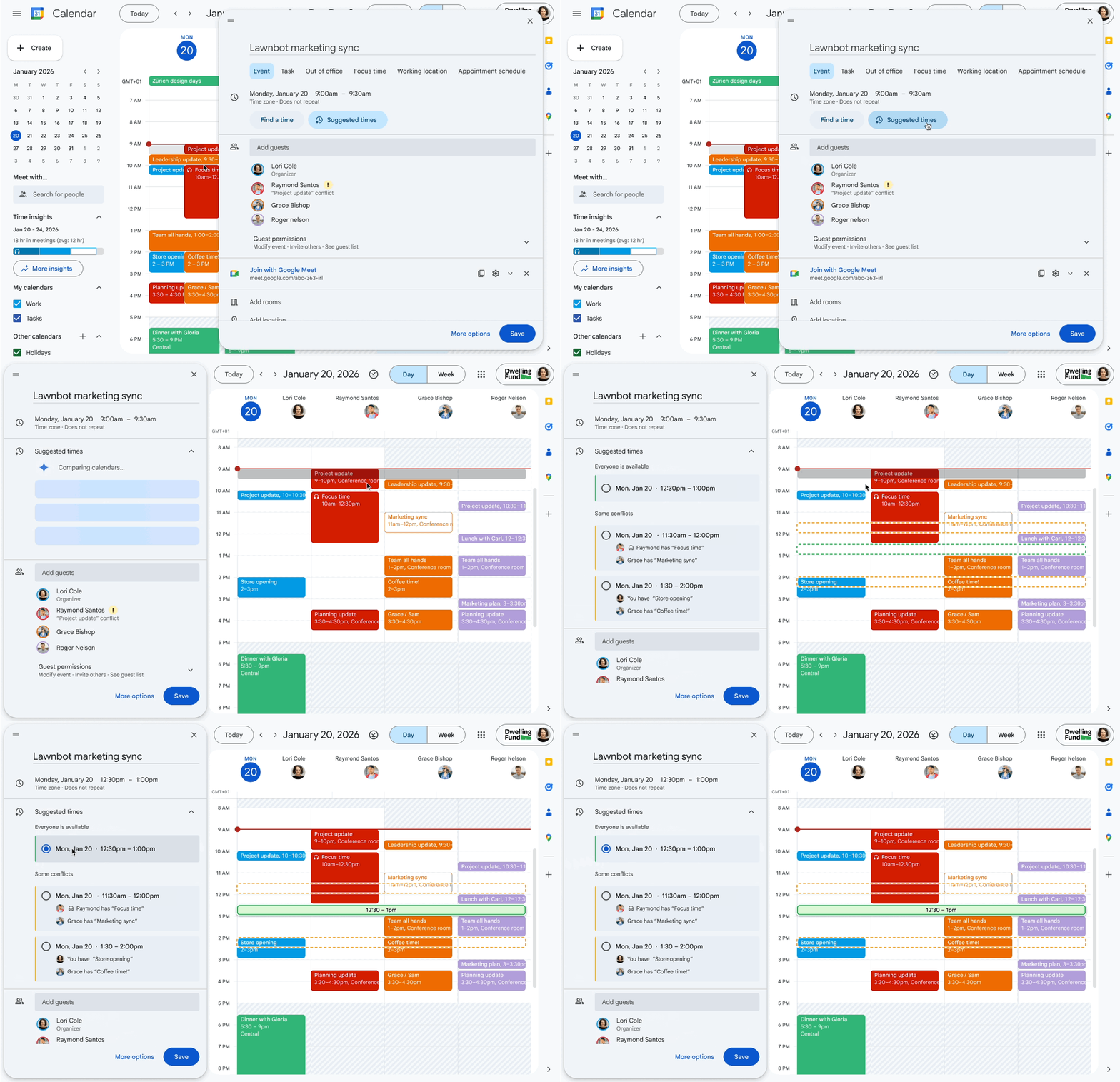
Get time suggestions for scheduling and rescheduling meetings with Gemini.
Forwarding emails to Chat: You can ensure everyone has the same information by forwarding a specific Gmail conversation to Chat. Users can send important client emails or critical project data to Chat, share announcements from mail, or move intense discussions out of the inbox. Once forwarded, the Gmail message will send a permanent link into the Chat conversation, ensuring every team member stays informed.
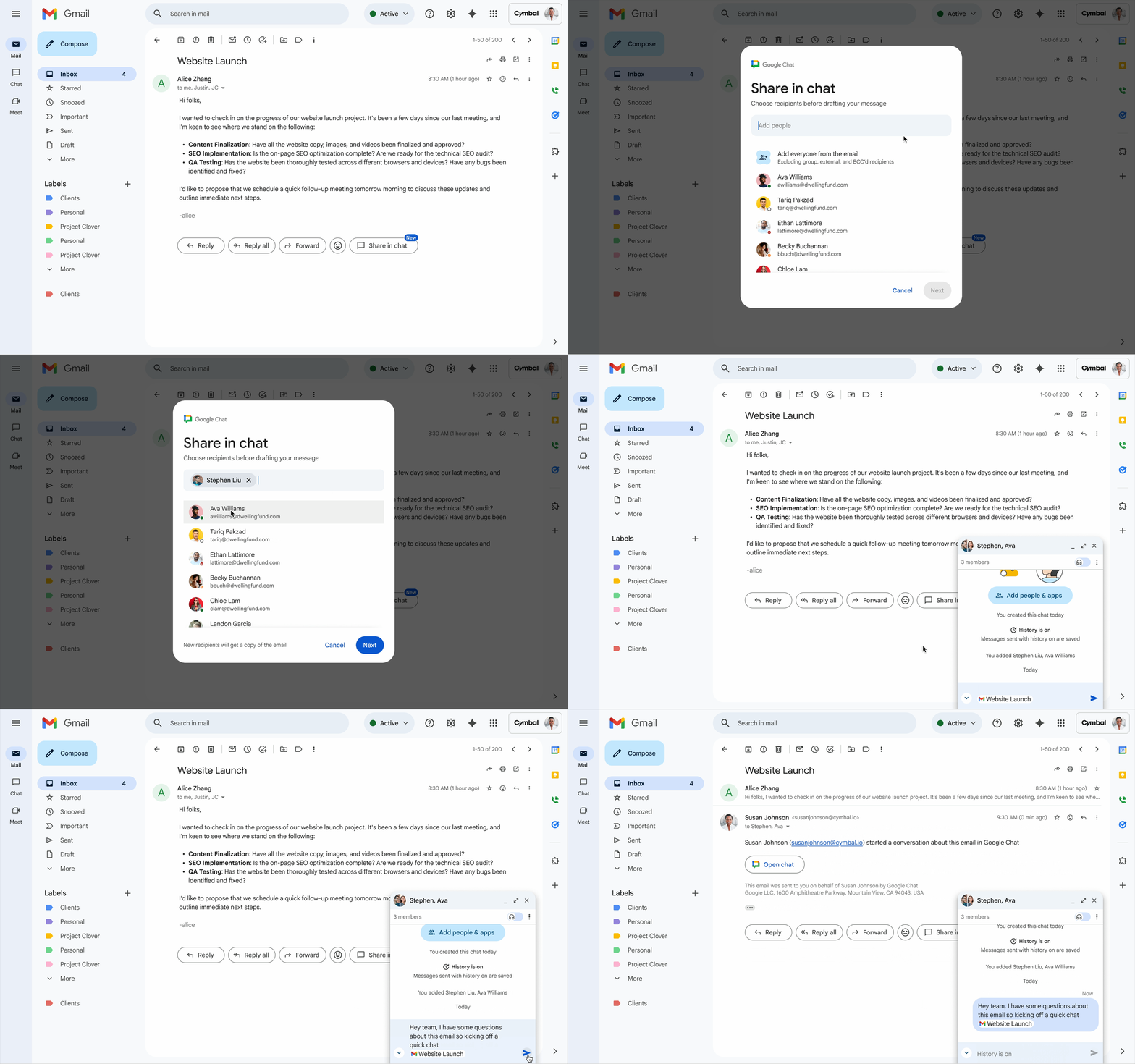
Share emails in Google Chat.
Optimize your team’s workflows with new apps for Google Chat
The Google team introduced new apps for Google Chat to connect essential business tools directly to Chat. This allows you to receive notifications, stay informed, and automate tasks without switching contexts.
- Manage projects and tasks in Asana with real-time previews and built-in notifications
- Implement visual collaboration in your team spaces with Figma and Miro
- Stay up to date with the latest news and updates using the new Feeds app
- Check your vacation balance and submit time-off requests in seconds with the enhanced Workday app
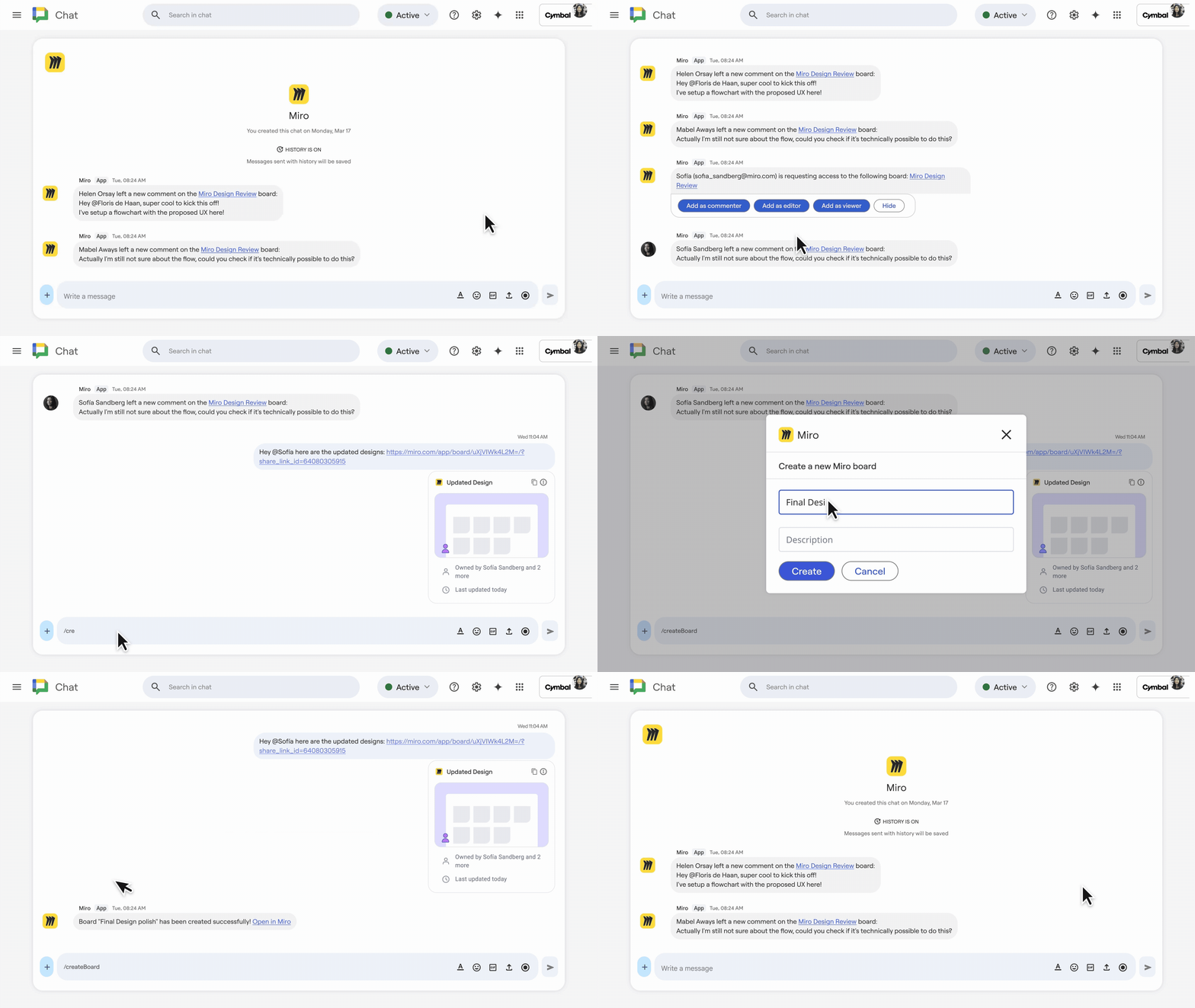
Integrate powerful visual collaboration tools with the new Miro app for Google Chat.
Break language barriers for global collaboration with expanded language support in Meet and Vids
Collaboration happens effortlessly across languages thanks to simultaneous speech translation in Google Meet. It not only instantly translates spoken words but also preserves the original tone and expressiveness of the speaker, so nothing is lost in translation. Speech translation is currently available between English, Spanish, French, Portuguese, and Italian.
The current version of Google Vids offers expanded language support for AI voiceovers and AI avatars. With seven new languages available (Spanish, French, Italian, German, Portuguese, Japanese, and Korean), creating engaging multilingual content has become easier. Simply write the script in the target language, and the AI avatar will do the rest.
Wise IT is an official Premier Partner of Google Workspace! Want a free consultation on the platform’s features? Contact our specialists and learn about the functionality, successful organization cases, and the optimal pricing plans for your organization: